FabCon is coming to Atlanta
Join us at FabCon Atlanta from March 16 - 20, 2026, for the ultimate Fabric, Power BI, AI and SQL community-led event. Save $200 with code FABCOMM.
Register now!- Power BI forums
- Get Help with Power BI
- Desktop
- Service
- Report Server
- Power Query
- Mobile Apps
- Developer
- DAX Commands and Tips
- Custom Visuals Development Discussion
- Health and Life Sciences
- Power BI Spanish forums
- Translated Spanish Desktop
- Training and Consulting
- Instructor Led Training
- Dashboard in a Day for Women, by Women
- Galleries
- Data Stories Gallery
- Themes Gallery
- Contests Gallery
- QuickViz Gallery
- Quick Measures Gallery
- Visual Calculations Gallery
- Notebook Gallery
- Translytical Task Flow Gallery
- TMDL Gallery
- R Script Showcase
- Webinars and Video Gallery
- Ideas
- Custom Visuals Ideas (read-only)
- Issues
- Issues
- Events
- Upcoming Events
The Power BI Data Visualization World Championships is back! Get ahead of the game and start preparing now! Learn more
- Power BI forums
- Forums
- Get Help with Power BI
- Desktop
- Dax - Left where position is a find result less 1 ...
- Subscribe to RSS Feed
- Mark Topic as New
- Mark Topic as Read
- Float this Topic for Current User
- Bookmark
- Subscribe
- Printer Friendly Page

- Mark as New
- Bookmark
- Subscribe
- Mute
- Subscribe to RSS Feed
- Permalink
- Report Inappropriate Content
Dax - Left where position is a find result less 1 position
Hi, i have a field that has a seperator "-" 2 times , Example :
4124124-RET-2242d
trtre121-1t5-123213
I´m new here, i get error on this, for the first split.
NewColumn = Lef(Field, find("-",Field,1,)-1)
if i try the Lef(Field, find("-",Field,1,)1) - Positive number it works)
Thanks.
Solved! Go to Solution.


- Mark as New
- Bookmark
- Subscribe
- Mute
- Subscribe to RSS Feed
- Permalink
- Report Inappropriate Content
Hi @Anonymous
OK so what are you actually trying to do?
Please provide enough sample data to illustrate the problems you are facing. You've supplied 2 examples of strings that contain - but then said not all of the strings contain -
If there is no - then SEARCH returns BLANK and that's an invalid agument for LEFT
Please explain what your expected results are.
Regards
Phil
Did I answer your question? Then please mark my post as the solution.
If I helped you, click on the Thumbs Up to give Kudos.
Blog :: YouTube Channel :: Connect on Linkedin
Proud to be a Super User!


- Mark as New
- Bookmark
- Subscribe
- Mute
- Subscribe to RSS Feed
- Permalink
- Report Inappropriate Content
This is easy in the Query Editor.
Go to the Home tab, choose Split Column by Delimiter (under Transform), use a Custom Delimiter, choose your - sign and choose to split at "Each occurrence of the delimiter".
(I know you want the DAX answer, but if you can do it in Query Editor, it's easier and it processes faster.)
- Mark as New
- Bookmark
- Subscribe
- Mute
- Subscribe to RSS Feed
- Permalink
- Report Inappropriate Content
This is easy in the Query Editor.
Go to the Home tab, choose Split Column by Delimiter (under Transform), use a Custom Delimiter, choose your - sign and choose to split at "Each occurrence of the delimiter".
(I know you want the DAX answer, but if you can do it in Query Editor, it's easier and it processes faster.)
- Mark as New
- Bookmark
- Subscribe
- Mute
- Subscribe to RSS Feed
- Permalink
- Report Inappropriate Content
Hi @Anonymous
OK so what are you actually trying to do?
Please provide enough sample data to illustrate the problems you are facing. You've supplied 2 examples of strings that contain - but then said not all of the strings contain -
If there is no - then SEARCH returns BLANK and that's an invalid agument for LEFT
Please explain what your expected results are.
Regards
Phil
Did I answer your question? Then please mark my post as the solution.
If I helped you, click on the Thumbs Up to give Kudos.
Blog :: YouTube Channel :: Connect on Linkedin
Proud to be a Super User!
- Mark as New
- Bookmark
- Subscribe
- Mute
- Subscribe to RSS Feed
- Permalink
- Report Inappropriate Content
Hi @Anonymous
What exactly are you trying to do?
If you want to get all the characters before the first - then use this
Column = LEFT([Column1],FIND("-",[Column1])-1)
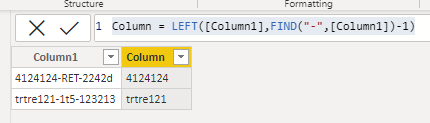
Regards
Phil
Did I answer your question? Then please mark my post as the solution.
If I helped you, click on the Thumbs Up to give Kudos.
Blog :: YouTube Channel :: Connect on Linkedin
Proud to be a Super User!
- Mark as New
- Bookmark
- Subscribe
- Mute
- Subscribe to RSS Feed
- Permalink
- Report Inappropriate Content
Error descrp: An argument of the 'LEFT' function has the wrong data type or an invalid value.
column = LEFT(cvg[Column1],SEARCH("-",[Column1],1,BLANK())-1)
some lines don't have the "-", so I put the rest of the find form, starting position (1) and if there is no "-" (Blank)
- Mark as New
- Bookmark
- Subscribe
- Mute
- Subscribe to RSS Feed
- Permalink
- Report Inappropriate Content
Hello and thank you all, and sorry for not mentioning that some lines do not have the seperator. but it worked in the power editor, I tried to do it again in dax for several columns, in a first try to get the position even for those who didn't have it (it got -1). and then lelft will fetch the number of characters in that column but the left always gives an error.
Helpful resources

Power BI Dataviz World Championships
The Power BI Data Visualization World Championships is back! Get ahead of the game and start preparing now!

Power BI Monthly Update - December 2025
Check out the December 2025 Power BI Holiday Recap!

FabCon Atlanta 2026
Join us at FabCon Atlanta, March 16-20, for the ultimate Fabric, Power BI, AI and SQL community-led event. Save $200 with code FABCOMM.

| User | Count |
|---|---|
| 38 | |
| 36 | |
| 33 | |
| 31 | |
| 28 |


| User | Count |
|---|---|
| 129 | |
| 88 | |
| 79 | |
| 68 | |
| 63 |


