Don't miss your chance to take the Fabric Data Engineer (DP-600) exam for FREE! Find out how by watching the DP-600 session on-demand now through April 28th.
Learn moreJoin the FabCon + SQLCon recap series. Up next: Power BI, Real-Time Intelligence, IQ and AI, and Data Factory take center stage. All sessions are available on-demand after the live show. Register now
Hi Everyone
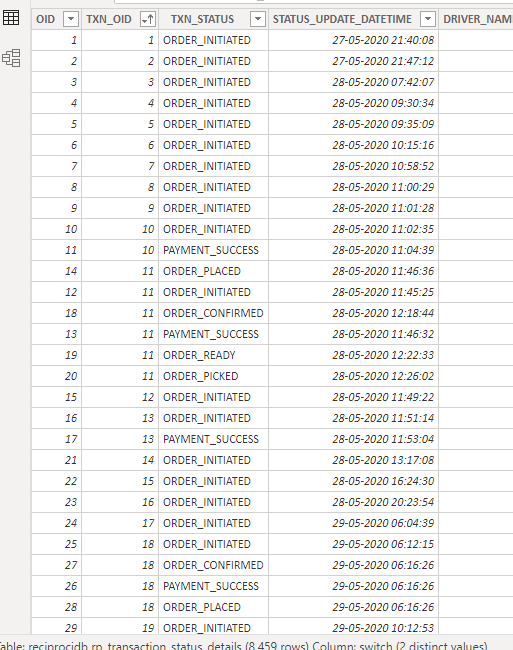
In this screenshot customer order initiated and payment success is in same txn id we want transaction completed or else customer is only order initiated we want payment failed.
txn_oid =10 < order_initiated
txn_oid =10 < Payment_success
txn_oid =2 < order_initiated
we want txn_oid 10 = completed
we want txn_oid 2 = payment failed
In this payment success or failure we want new column, so please sort me out
Solved! Go to Solution.
Hi,@Anonymous
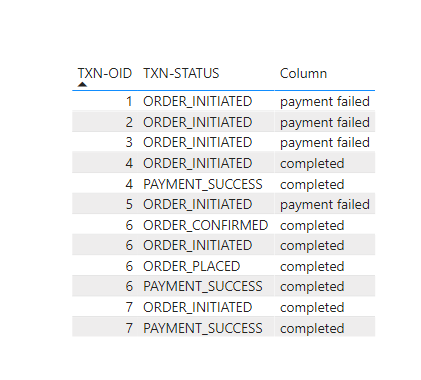
According to your description,I think you can create a column to calculate the desired result,like this:
Column =
VAR a =
CALCULATETABLE (
DISTINCT ( 'Table'[TXN-OID] ),
FILTER ( ALL ( 'Table' ), [TXN-STATUS] = "ORDER_INITIATED" )
)
VAR c =
CALCULATETABLE (
DISTINCT ( 'Table'[TXN-OID] ),
FILTER ( ALL ( 'Table' ), [TXN-STATUS] = "PAYMENT_SUCCESS" )
)
RETURN
IF ( [TXN-OID] IN a && [TXN-OID] IN c, "completed", "payment failed" )OR:
Column 2 =
VAR a =
COUNTROWS (
FILTER (
'Table',
[TXN-OID] = EARLIER ( 'Table'[TXN-OID] )
&& [TXN-STATUS] = "ORDER_INITIATED"
)
)
VAR b =
COUNTROWS (
FILTER (
'Table',
[TXN-OID] = EARLIER ( 'Table'[TXN-OID] )
&& [TXN-STATUS] = "PAYMENT_SUCCESS"
)
)
RETURN
IF ( b > 0 && a > 0, "completed", "payment failed" )
If it doesn’t solve your problem, please feel free to ask me.
Best Regards
Janey Guo
If this post helps, then please consider Accept it as the solution to help the other members find it more quickly.
Hi,@Anonymous
According to your description,I think you can create a column to calculate the desired result,like this:
Column =
VAR a =
CALCULATETABLE (
DISTINCT ( 'Table'[TXN-OID] ),
FILTER ( ALL ( 'Table' ), [TXN-STATUS] = "ORDER_INITIATED" )
)
VAR c =
CALCULATETABLE (
DISTINCT ( 'Table'[TXN-OID] ),
FILTER ( ALL ( 'Table' ), [TXN-STATUS] = "PAYMENT_SUCCESS" )
)
RETURN
IF ( [TXN-OID] IN a && [TXN-OID] IN c, "completed", "payment failed" )OR:
Column 2 =
VAR a =
COUNTROWS (
FILTER (
'Table',
[TXN-OID] = EARLIER ( 'Table'[TXN-OID] )
&& [TXN-STATUS] = "ORDER_INITIATED"
)
)
VAR b =
COUNTROWS (
FILTER (
'Table',
[TXN-OID] = EARLIER ( 'Table'[TXN-OID] )
&& [TXN-STATUS] = "PAYMENT_SUCCESS"
)
)
RETURN
IF ( b > 0 && a > 0, "completed", "payment failed" )
If it doesn’t solve your problem, please feel free to ask me.
Best Regards
Janey Guo
If this post helps, then please consider Accept it as the solution to help the other members find it more quickly.
Hmm, at a guess that probably means that you have at least 1 TXN_OID that has multiple rows with the same status_update_datetime value.
You could work around that by doing the following and just checking if one of those rows contains a "PAYMENT_SUCCESSFUL" status
Payment Status =
var txnOid = [TXN_OID]
var maxDate = MAXX( FILTER(ALL(Transactions[TXN_OID], Transactions[STATUS_UPDATE_DATETIME]), Transactions[TXN_OID] = txnOid), Transactions[STATUS_UPDATE_DATETIME])
var lastStatus = COUNTROWS(FILTER(Transactions, Transactions[TXN_STATUS] = "PAYMENT_SUCCESSFUL" && Transactions[TXN_OID] && txnOid && Transactions[STATUS_UPDATE_DATETIME] = maxDate))
return if( lastStatus >= 1 , "completed", "payment failed")
Assuming that your table is called 'Transactions' you could use an expression like the following to find the maximum updated datetime and then lookup the status
Payment Status =
var txnOid = [TXN_OID]
var maxDate =
MAXX(
FILTER(ALL(Transactions[TXN_OID], Transactions[STATUS_UPDATE_DATETIME]),
Transactions[TXN_OID] = txnOid)
, Transactions[STATUS_UPDATE_DATETIME])
var lastStatus = LOOKUPVALUE(Transactions[TXN_STATUS]
, Transactions[TXN_OID] , txnOid
, Transactions[STATUS_UPDATE_DATETIME], maxDate)
return if( lastStatus = "PAYMENT_SUCCESSFUL", "completed", "payment failed")
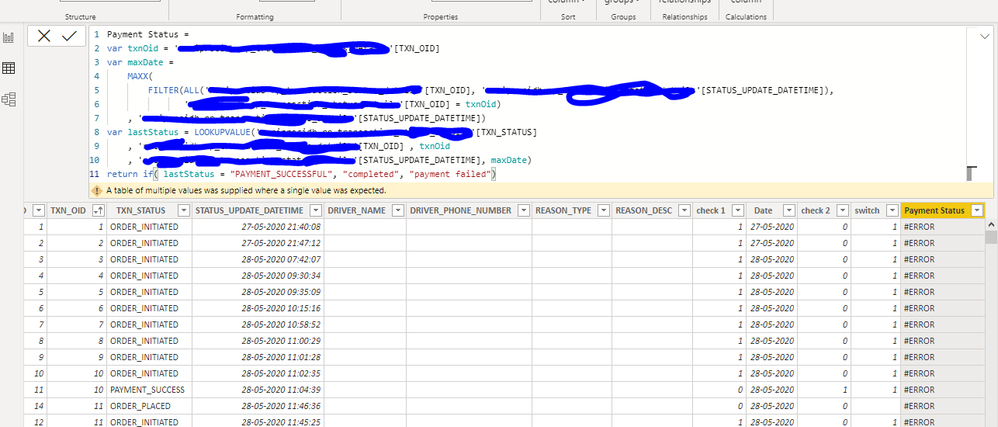
Am trying this dax. but am gettting some error
Check out the April 2026 Power BI update to learn about new features.
If you have recently started exploring Fabric, we'd love to hear how it's going. Your feedback can help with product improvements.
A new Power BI DataViz World Championship is coming this June! Don't miss out on submitting your entry.
| User | Count |
|---|---|
| 41 | |
| 37 | |
| 34 | |
| 21 | |
| 16 |
| User | Count |
|---|---|
| 65 | |
| 62 | |
| 31 | |
| 26 | |
| 25 |