This is best Fabric, Power BI, SQL and AI community event. How do we know? The last event sold out! Save €200 with code FABCMTY200.
Register nowA new Data Days event is coming soon! This time we’re going bigger than ever. Fabric, Power BI, SQL, AI and more. Don't miss out.
Hi,
I'm looking for a DAX formula which can help me get the below mentioned results.
| Account Name | Country | Revenue | |
| XYZ | Singapore | 1000 | Ignore This |
| XYZ | Thailand | 800 | Ignore This |
| XYZ | Vietnam | 900 | Ignore This |
| XYZ | Sri Lanka | 1200 | Consider this |
| ABC | Singapore | 400 | Consider this |
| DEF | Philippines | 200 | Consider this |
For example, there's an account with multiple engagements in different locations. I should consider the account with highest revenue in a given location and ignore the rest.
Any help on this would be really appreciated!!
Thanks in advance!
Regards,
Mahesh
Solved! Go to Solution.
@Anonymous ,
new column =
var _max = maxx(filter(Table, [Account Name] = earlier([Account Name])),[Revenue])
return
if( [Revenue] =_max, [Country],blank())
Hi, @Anonymous
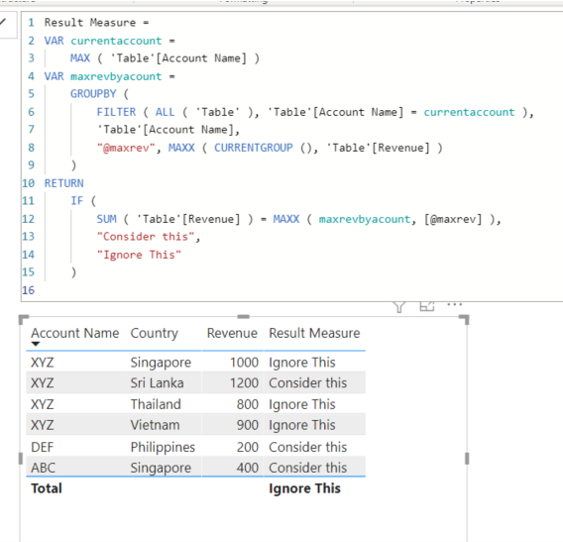
Please check the below measure.
Result Measure =
VAR currentaccount =
MAX ( 'Table'[Account Name] )
VAR maxrevbyacount =
GROUPBY (
FILTER ( ALL ( 'Table' ), 'Table'[Account Name] = currentaccount ),
'Table'[Account Name],
"@maxrev", MAXX ( CURRENTGROUP (), 'Table'[Revenue] )
)
RETURN
IF (
SUM ( 'Table'[Revenue] ) = MAXX ( maxrevbyacount, [@maxrev] ),
"Consider this",
"Ignore This"
)
Hi, My name is Jihwan Kim.
If this post helps, then please consider accept it as the solution to help other members find it faster, and give a big thumbs up.
Linkedin: https://www.linkedin.com/in/jihwankim1975/
hi @Jihwan_Kim ,
Thank you for responding so quickly.
I'm looking for the result as below:
| Account Name | Country | Revenue | Country_Result |
| XYZ | Singapore | 1000 | |
| XYZ | Thailand | 800 | |
| XYZ | Vietnam | 900 | |
| XYZ | Sri Lanka | 1200 | Sri Lanka |
| ABC | Singapore | 400 | Singapore |
| DEF | Philippines | 200 | Philippines |
If the the critiria isn't matching, I should get a blank else the Country name.
@Anonymous , Try like
new column =
var _max = maxx(filter(Table, [Account Name] = earlier([Account Name])),[Revenue])
return
if( [Revenue] =_max, "Consider this", "Ignore This")
Hi @amitchandak ,
Thank you for your swift response.
I'm looking for the result as below:
| Account Name | Country | Revenue | Country_Result |
| XYZ | Singapore | 1000 | |
| XYZ | Thailand | 800 | |
| XYZ | Vietnam | 900 | |
| XYZ | Sri Lanka | 1200 | Sri Lanka |
| ABC | Singapore | 400 | Singapore |
| DEF | Philippines | 200 | Philippines |
If the the critiria isn't matching, I should get a blank else the Country name.
@Anonymous ,
new column =
var _max = maxx(filter(Table, [Account Name] = earlier([Account Name])),[Revenue])
return
if( [Revenue] =_max, [Country],blank())
Check out the May 2026 Power BI update to learn about new features.
Sign up to receive a private message when registration opens and key events begin.
If you have recently started exploring Fabric, we'd love to hear how it's going. Your feedback can help with product improvements.
| User | Count |
|---|---|
| 32 | |
| 25 | |
| 24 | |
| 22 | |
| 13 |
| User | Count |
|---|---|
| 61 | |
| 47 | |
| 27 | |
| 24 | |
| 19 |