This time we’re going bigger than ever. Fabric, Power BI, SQL, AI and more. We're covering it all. You won't want to miss it.
Learn moreLevel up your Power BI skills this month - build one visual each week and tell better stories with data! Get started
Hello
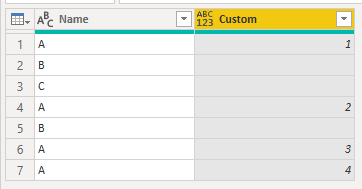
Could you please help me to create this condition index column see the example
Name Index
A 1
B
C
A 2
B
A 3
A 4
Solved! Go to Solution.
Hi @RENJITH_R_S
Download sample PBIX file with this code.
This works in Power Query
let
Source = Table.FromRows(Json.Document(Binary.Decompress(Binary.FromText("i45WclSK1YlWcgKTzmASWcQRRsYCAA==", BinaryEncoding.Base64), Compression.Deflate)), let _t = ((type nullable text) meta [Serialized.Text = true]) in type table [Name = _t]),
#"Added Index" = Table.AddIndexColumn(Source, "Index", 1, 1, Int64.Type),
#"Added Custom" = Table.AddColumn(#"Added Index", "Custom", each if [Name] = "A" then List.Count(List.Select(List.FirstN(#"Added Index"[Name], [Index]), each _ = "A")) else ""),
#"Removed Columns" = Table.RemoveColumns(#"Added Custom",{"Index"})
in
#"Removed Columns"
I'll see if I can do it in DAX too.
Regards
Phil
Proud to be a Super User!
Hi @RENJITH_R_S
Download sample PBIX file with this code.
This works in Power Query
let
Source = Table.FromRows(Json.Document(Binary.Decompress(Binary.FromText("i45WclSK1YlWcgKTzmASWcQRRsYCAA==", BinaryEncoding.Base64), Compression.Deflate)), let _t = ((type nullable text) meta [Serialized.Text = true]) in type table [Name = _t]),
#"Added Index" = Table.AddIndexColumn(Source, "Index", 1, 1, Int64.Type),
#"Added Custom" = Table.AddColumn(#"Added Index", "Custom", each if [Name] = "A" then List.Count(List.Select(List.FirstN(#"Added Index"[Name], [Index]), each _ = "A")) else ""),
#"Removed Columns" = Table.RemoveColumns(#"Added Custom",{"Index"})
in
#"Removed Columns"
I'll see if I can do it in DAX too.
Regards
Phil
Proud to be a Super User!
Hello
And what would it be like if I wanted him to tell me all the lyrics? For example, when sorting the names, it would look like this:
A 1
A 2
A 3
A 4
B 1
B 2
C 1
In advance thank you very much!
Check out the April 2026 Power BI update to learn about new features.
Sign up to receive a private message when registration opens and key events begin.
If you have recently started exploring Fabric, we'd love to hear how it's going. Your feedback can help with product improvements.
| User | Count |
|---|---|
| 35 | |
| 32 | |
| 25 | |
| 22 | |
| 18 |
| User | Count |
|---|---|
| 66 | |
| 36 | |
| 32 | |
| 25 | |
| 23 |