Share feedback directly with Fabric product managers, participate in targeted research studies and influence the Fabric roadmap.
Sign up nowGet Fabric certified for FREE! Don't miss your chance! Learn more
Dear All ;
i need your supports about creating a columnB
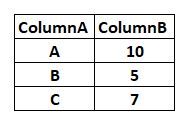
İ have ColumnA ;
When ColumnA is A ; Column B will be 10
When ColumnA is B ; Column B will be 5
When ColumnA is C ; Column B will be 7
thanks in advance for your supports
Solved! Go to Solution.
2 Options:
Column B = IF (COLUMNA= "A", 10, IF (COLUMNA= "B", 5, IF (COLUMNA= "C", 7, BLANK())))
Column B =
SWITCH (
TRUE (),
'Table'[Column A] = "A" , 10,
'Table'[Column A] = "B" , 5,
'Table'[Column A] = "C" , 7,
BLANK()
)
Hi @erhan_79,
This looks like an odd behavior. Please click the "refresh" button on the top ribbon to see if it works. Re-load the data table and re-create the calculated Column B for a test.
Regards,
Yuliana Gu
2 Options:
Column B = IF (COLUMNA= "A", 10, IF (COLUMNA= "B", 5, IF (COLUMNA= "C", 7, BLANK())))
Column B =
SWITCH (
TRUE (),
'Table'[Column A] = "A" , 10,
'Table'[Column A] = "B" , 5,
'Table'[Column A] = "C" , 7,
BLANK()
)
dear @themistoklis
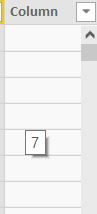
thanks for your kind support ; it seems work but i could not undersatnd that : after i created the column , cells seems empty but when i come on the cell with mouse it shows with popup there is the value that i wanted , why it is like that , it is like there is value in the cell but not seem, also from filter i can filter too but again value is not seemed
I find it very strange. This shouldnt be happeing.
Can you share the dataset with us? Maybe there is an extra space in the raw data....
If you love stickers, then you will definitely want to check out our Community Sticker Challenge!
Check out the January 2026 Power BI update to learn about new features.
| User | Count |
|---|---|
| 65 | |
| 64 | |
| 45 | |
| 21 | |
| 18 |
| User | Count |
|---|---|
| 119 | |
| 116 | |
| 38 | |
| 36 | |
| 27 |