cancel
Showing results for 
Search instead for 
Did you mean: 

Learn from the best! Meet the four finalists headed to the FINALS of the Power BI Dataviz World Championships! Register now

Reply
Anonymous
Not applicable

Dax Conditional formatting

Hi,


I've created a field parameter with a set of measures which returns % values. I'd need to get a colour format based on the selected measure. 

I'm trying to get a dynamic colour format using below DAX:


CCcolorFormat =
                SWITCH(
                        TRUE(),
                        SELECTEDMEASURE() >= 0.90, "#00FF00",
                        SELECTEDMEASURE() >= 0.85, "#FFA500",
                        SELECTEDMEASURE() < 0.85, "#FF0000")

I'm not sure where I'm going wrong but the visual doesn't change any colours when using this DAX on the visual. Any help on this would be really appreciated.

Regards,
Mahesh
1 ACCEPTED SOLUTION
Jihwan_Kim
Super User
Super User

Hi,

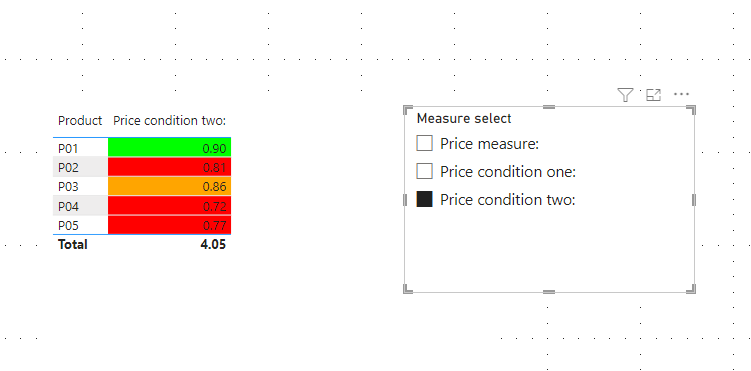
I am not sure if I understood your question correctly, but I tried to create a sample pbix file like below.

Please check the below picture and the attached pbix file whether it suits your requirement.


Jihwan_Kim_0-1662968977201.png


If this post helps, then please consider accepting it as the solution to help other members find it faster, and give a big thumbs up.


Click here to visit my LinkedIn page

View solution in original post

4 REPLIES 4
Jihwan_Kim
Super User
Super User

Hi,

I am not sure if I understood your question correctly, but I tried to create a sample pbix file like below.

Please check the below picture and the attached pbix file whether it suits your requirement.


Jihwan_Kim_0-1662968977201.png


If this post helps, then please consider accepting it as the solution to help other members find it faster, and give a big thumbs up.


Click here to visit my LinkedIn page

Anonymous
Not applicable

Hi @Jihwan_Kim ,

I've tried to implement your solution, however, I still don't get the colour format on the KPI visual.

Hi,

Thank you for your feedback.

Could you please share your pbix file's link? And then I can try to look into it to come up with a more accurate solution for your data model.

Thank you.


If this post helps, then please consider accepting it as the solution to help other members find it faster, and give a big thumbs up.


Click here to visit my LinkedIn page

Anonymous
Not applicable

Hi @Jihwan_Kim ,


I really appreciate your help on this. But, I'd be able to share the file as it contains sensitive and confidential data.

I've tried something by making a few changes from my end based on your previous solution and it's working for me.

Thanks a ton for the help!!!!

Regards,

Mahesh

Helpful resources

Announcements
Join our Fabric User Panel

Join our Fabric User Panel

Share feedback directly with Fabric product managers, participate in targeted research studies and influence the Fabric roadmap.

February Power BI Update Carousel

Power BI Monthly Update - February 2026

Check out the February 2026 Power BI update to learn about new features.

FabCon Atlanta 2026 carousel

FabCon Atlanta 2026

Join us at FabCon Atlanta, March 16-20, for the ultimate Fabric, Power BI, AI and SQL community-led event. Save $200 with code FABCOMM.