Get certified for free when you join Fabric Data Days 2026 and dive into Fabric, Power BI, SQL, AI, and other essential data skills.
Join nowData Days is here! Join us now for 60+ days of learning, challenges, and connection. Learn more
Hi,
I've created a field parameter with a set of measures which returns % values. I'd need to get a colour format based on the selected measure.
I'm trying to get a dynamic colour format using below DAX:
Solved! Go to Solution.
Hi,
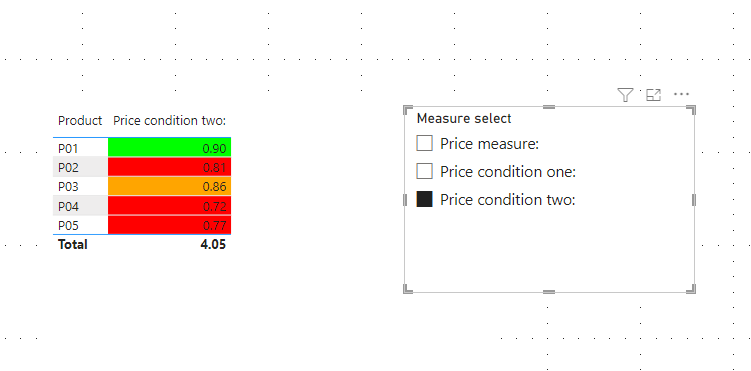
I am not sure if I understood your question correctly, but I tried to create a sample pbix file like below.
Please check the below picture and the attached pbix file whether it suits your requirement.
Hi,
I am not sure if I understood your question correctly, but I tried to create a sample pbix file like below.
Please check the below picture and the attached pbix file whether it suits your requirement.
Hi @Jihwan_Kim ,
I've tried to implement your solution, however, I still don't get the colour format on the KPI visual.
Hi,
Thank you for your feedback.
Could you please share your pbix file's link? And then I can try to look into it to come up with a more accurate solution for your data model.
Thank you.
Hi @Jihwan_Kim ,
I really appreciate your help on this. But, I'd be able to share the file as it contains sensitive and confidential data.
I've tried something by making a few changes from my end based on your previous solution and it's working for me.
Thanks a ton for the help!!!!
Regards,
Mahesh
Don't miss out on Data Days, June 15 through August 7. Learn Fabric, Power BI, SQL, AI and more.
Check out the May 2026 Power BI update to learn about new features.
| User | Count |
|---|---|
| 23 | |
| 23 | |
| 21 | |
| 17 | |
| 14 |
| User | Count |
|---|---|
| 58 | |
| 50 | |
| 37 | |
| 29 | |
| 24 |