cancel
Showing results for 
Search instead for 
Did you mean: 

We've captured the moments from FabCon & SQLCon that everyone is talking about, and we are bringing them to the community, live and on-demand. Starts on April 14th. Register now

Reply
vincentakatoh
Helper IV
Helper IV

Datetable and Summarize Column

Hi, 


Used summarise column to calculate roll yield (= A*B*C). Also created a Datetable. 


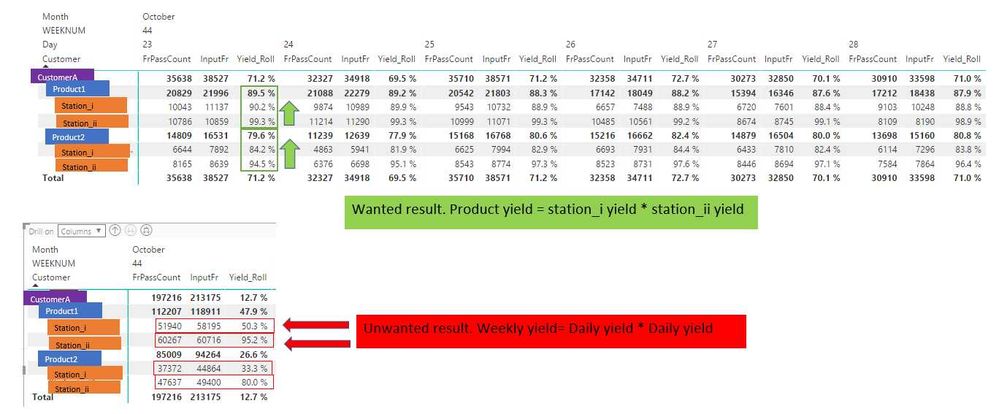
Que: Any way to re-write dax such that roll yield does not apply when I drill up from date to week? Currently roll yield applies for station to product and date to week. 


2017-11-03 11_31_29-Book1 - Excel.jpg

RollYieldFam = 
    SUMMARIZECOLUMNS(
		'Data2'[Customer],
		'Data2'[Family],
    	'Data2'[station],		
		'Data2'[TestDate],
		"OutputFr",sum(Data2[OutputFr]),
		"FrPassCount",sum(Data2[FirstPassQty]),
        "FrFailCount",sum(Data2[FirstFailQty]),
		"InputFr",SUMX(data2, [FirstFailQty]+Data2[FirstPassQty]),
        "YieldFr",DIVIDE(sum(Data2[FirstPassQty]),sum(Data2[InputFr]),1)
        	)


Yield_Roll = CALCULATE(PRODUCT([YieldFr]))


1 ACCEPTED SOLUTION

Hi @v-yulgu-msft


Thanks. Solved problem with help from @v-jiascu-msft. or rather work around the problem by not using summarizecolumns. 


Sample file attached. Appreciate reply from both again. 


https://1drv.ms/u/s!ArjVwEnHONXNggfW2ETtdFOTf9Zx


View solution in original post

3 REPLIES 3
vincentakatoh
Helper IV
Helper IV

Hi, 

Provided Sample DAX in below link. Hopefully this can explain my problem better. Please help!


https://1drv.ms/u/s!ArjVwEnHONXNggSTw6hzNhK3NzjV


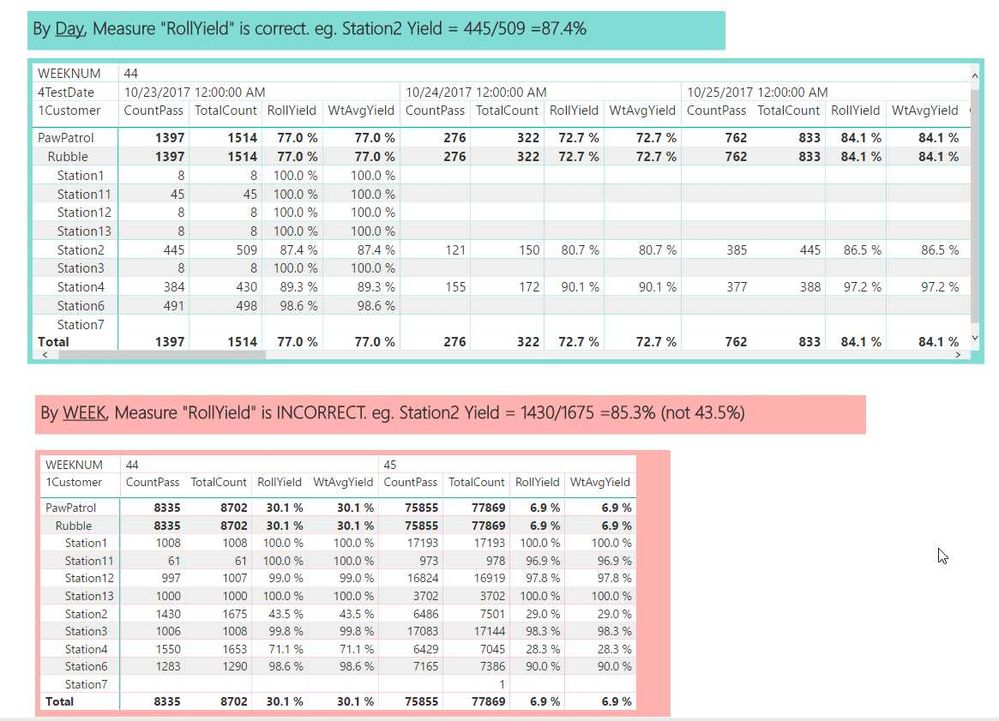
2017-11-07 09_32_52-PawPatrol3 - Power BI Desktop.jpg

Hi @vincentakatoh,


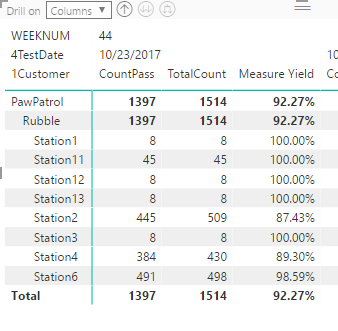
Below measure can return correct percentage (CountPass/Totalcount) per level.

Measure Yield = DIVIDE(SUM(Yield[CountPass]),SUM(Yield[TotalCount]),1)

1.PNG    2.PNG


But, based on my test, it seems that PRODUCT function always evaluates the product value for each detailed row in whole table. So, when we drill up to weekly level, it returns wrong result.


If you work it out later, appreciate that you could share your solution here.


Best regards,
Yuliana Gu

Community Support Team _ Yuliana Gu
If this post helps, then please consider Accept it as the solution to help the other members find it more quickly.

Hi @v-yulgu-msft


Thanks. Solved problem with help from @v-jiascu-msft. or rather work around the problem by not using summarizecolumns. 


Sample file attached. Appreciate reply from both again. 


https://1drv.ms/u/s!ArjVwEnHONXNggfW2ETtdFOTf9Zx


Helpful resources

Announcements
New to Fabric survey Carousel

New to Fabric Survey

If you have recently started exploring Fabric, we'd love to hear how it's going. Your feedback can help with product improvements.

Power BI DataViz World Championships carousel

Power BI DataViz World Championships - June 2026

A new Power BI DataViz World Championship is coming this June! Don't miss out on submitting your entry.

Join our Fabric User Panel

Join our Fabric User Panel

Share feedback directly with Fabric product managers, participate in targeted research studies and influence the Fabric roadmap.

March Power BI Update Carousel

Power BI Community Update - March 2026

Check out the March 2026 Power BI update to learn about new features.