Join us at FabCon Atlanta from March 16 - 20, 2026, for the ultimate Fabric, Power BI, AI and SQL community-led event. Save $200 with code FABCOMM.
Register now!The Power BI Data Visualization World Championships is back! Get ahead of the game and start preparing now! Learn more
Hi, I am using the below DAX query for DatesYTD calculation.
In the last calcuate function, for which ever month the employee count is 0, then my DatesYTD function too gives 0 only.
Example:-
January - 4 ----- DatesYTD is 4
February - 5 ----- DatesYTD is 9
March - Blank() ----- DatesYTD coming Blank() -- This is worng
April - 6 ----- DatesYTD is 15
Solved! Go to Solution.
Hi @Anonymous
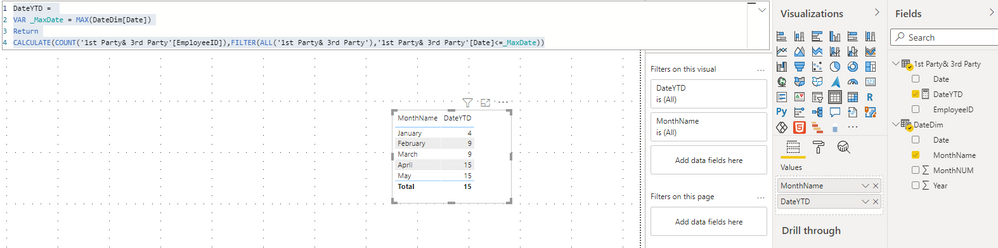
I think you want to get a running total by Month. So March = blank is wrong, you want March = 9.
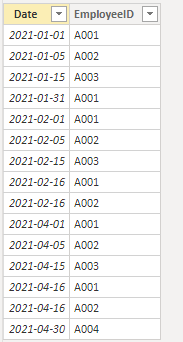
Due to I don't know your data model, I build a sample to have a test.
My Sample:
I build a unrelated DimDate table by dax.
DateDim = ADDCOLUMNS(CALENDAR(DATE(2021,01,01),TODAY()),"Year",YEAR([Date]),"MonthNUM",MONTH([Date]),"MonthName",FORMAT([Date],"MMMM"))
Measure:
DateYTD =
VAR _MaxDate = MAX(DateDim[Date])
Return
CALCULATE(COUNT('1st Party& 3rd Party'[EmployeeID]),FILTER(ALL('1st Party& 3rd Party'),'1st Party& 3rd Party'[Date]<=_MaxDate))
Result:
Best Regards,
Rico Zhou
If this post helps, then please consider Accept it as the solution to help the other members find it more quickly.
Hi @Anonymous
I think you want to get a running total by Month. So March = blank is wrong, you want March = 9.
Due to I don't know your data model, I build a sample to have a test.
My Sample:
I build a unrelated DimDate table by dax.
DateDim = ADDCOLUMNS(CALENDAR(DATE(2021,01,01),TODAY()),"Year",YEAR([Date]),"MonthNUM",MONTH([Date]),"MonthName",FORMAT([Date],"MMMM"))
Measure:
DateYTD =
VAR _MaxDate = MAX(DateDim[Date])
Return
CALCULATE(COUNT('1st Party& 3rd Party'[EmployeeID]),FILTER(ALL('1st Party& 3rd Party'),'1st Party& 3rd Party'[Date]<=_MaxDate))
Result:
Best Regards,
Rico Zhou
If this post helps, then please consider Accept it as the solution to help the other members find it more quickly.
@Anonymous ,Can you share sample data and sample output in table format? Or a sample pbix after removing sensitive data.
You have to make sure DateDim is marked as a date table, You have to use month year from the date table
There are 5 reason -Why Time Intelligence Fails - Power bi 5 Savior Steps for TI: https://youtu.be/OBf0rjpp5Hw
The Power BI Data Visualization World Championships is back! Get ahead of the game and start preparing now!
| User | Count |
|---|---|
| 39 | |
| 38 | |
| 38 | |
| 28 | |
| 27 |
| User | Count |
|---|---|
| 124 | |
| 88 | |
| 73 | |
| 66 | |
| 65 |