Join us at FabCon Atlanta from March 16 - 20, 2026, for the ultimate Fabric, Power BI, AI and SQL community-led event. Save $200 with code FABCOMM.
Register now!View all the Fabric Data Days sessions on demand. View schedule
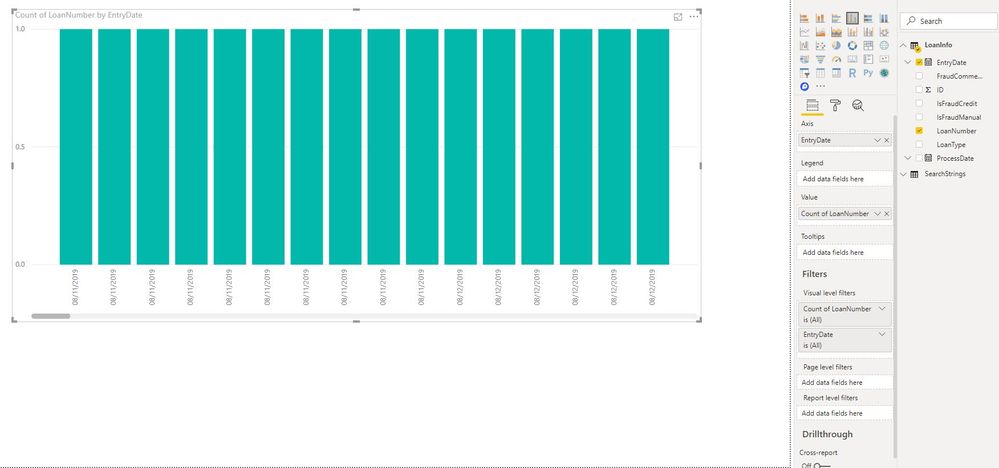
can you please tell me what i am missing in my report? I am trying to display the count of loans by entry date. And the dates are showing individually. I would like similar dates to combine. Thanks
Solved! Go to Solution.
Hi @v-juanli-msft ,
Thanks for replying. I was actually able to fix my problem by changing the column type to 'date only' under edit queries. For some reason, powerbi seem to still think that the column is datetime even though the format is already changed within the table, the format is already showing date and the column is already showing the date only value.
This is the first time i have used the option 'date only'. But it works :).
Thanks again
Glen
Hi @gco
I can't reproduce your problem.
Could you paste some data here so i can test with it?
Best Regards
Maggie
Community Support Team _ Maggie Li
If this post helps, then please consider Accept it as the solution to help the other members find it more quickly.
Hi @v-juanli-msft ,
Thanks for replying. I was actually able to fix my problem by changing the column type to 'date only' under edit queries. For some reason, powerbi seem to still think that the column is datetime even though the format is already changed within the table, the format is already showing date and the column is already showing the date only value.
This is the first time i have used the option 'date only'. But it works :).
Thanks again
Glen
If i set the EntryDate with Hierarchy(Day), then it is able to show the # of loans per day correctly. But I also wanted it to show as MM/dd/yyyy - not in a hierarchy. Any help will be appreciated. Thank you
Check out the November 2025 Power BI update to learn about new features.
Advance your Data & AI career with 50 days of live learning, contests, hands-on challenges, study groups & certifications and more!