Join us at FabCon Atlanta from March 16 - 20, 2026, for the ultimate Fabric, Power BI, AI and SQL community-led event. Save $200 with code FABCOMM.
Register now!The Power BI Data Visualization World Championships is back! Get ahead of the game and start preparing now! Learn more
Hi All,
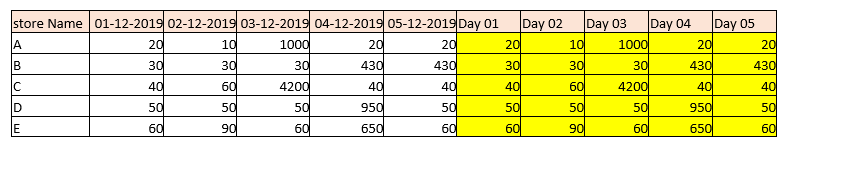
I want to add columns Day 01,Day 02....Day 31 Dynamically based on Days in month. Could you please help me to achieve this in power BI?
Thanks,
RSD.
You can always have a column in date table or your table
day = "Day" & day(Date)
or
day = "Day" & format(Date,"DD")
Appreciate your Kudos. In case, this is the solution you are looking for, mark it as the Solution. In case it does not help, please provide additional information and mark me with @
Thanks. My Recent Blog -
Winner-Topper-on-Map-How-to-Color-States-on-a-Map-with-Winners , HR-Analytics-Active-Employee-Hire-and-Termination-trend
Power-BI-Working-with-Non-Standard-Time-Periods And Comparing-Data-Across-Date-Ranges
Connect on Linkedin
Hi @amitchandak ,
Thanks for your response , but I want this value needs to be changed dynmaically. Let suppose in next Month instead of December , I have data for January 2020( 1st -31st). So all Day 1 to Day 30 Values needs to be changed dynamically.
With your cuurent sloution all 31 dates needs to changed manually for next update.
regards,
RSD
The Power BI Data Visualization World Championships is back! Get ahead of the game and start preparing now!
| User | Count |
|---|---|
| 38 | |
| 37 | |
| 33 | |
| 32 | |
| 29 |
| User | Count |
|---|---|
| 129 | |
| 88 | |
| 79 | |
| 68 | |
| 63 |