Share feedback directly with Fabric product managers, participate in targeted research studies and influence the Fabric roadmap.
Sign up nowGet Fabric certified for FREE! Don't miss your chance! Learn more
Hi team.
I'm using the DATEDIFF function to get the difference between two dates in hours (simple enough) like this
I only need to exclude Saturday and Sunday. If the date is one of those days, it should be set to Monday 7am.
Can you help me on this?
Solved! Go to Solution.
This file has a few datediff. Use the one without weekend for your reference on page 2, measure = [Working Days]
https://www.dropbox.com/s/y47ah38sr157l7t/Order_delivery_date_diff.pbix?dl=0
Hi @Jotad710 ,
You can use WEEKDAY() function to get the weekday of the date.
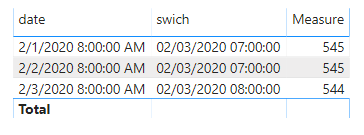
Please refer to the measure below.
Measure =
var sv = SELECTEDVALUE('Table'[date])
var swich = SWITCH(WEEKDAY(sv,2),6,FORMAT(sv+2,"MM/DD/YYYY")&" 7:00:00 AM",7,FORMAT(sv+1,"MM/DD/YYYY")&" 7:00:00 AM",sv)
return
DATEDIFF(swich,TODAY(),HOUR)
BTW, you can refer to the following topics if you want to calculate datediff between two dates only count working days.
https://community.powerbi.com/t5/Desktop/DATEDIFF-Working-Days/m-p/130662.
https://community.powerbi.com/t5/Desktop/DATEDIFF-without-weekends/m-p/808620.
Best Regards,
Jay
Community Support Team _ Jay Wang
If this post helps, then please consider Accept it as the solution to help the other members find it more quickly.
I wrote a NETWORKDAYS measure quite a while ago:
https://community.powerbi.com/t5/Quick-Measures-Gallery/Net-Work-Days/m-p/367362#M109
This file has a few datediff. Use the one without weekend for your reference on page 2, measure = [Working Days]
https://www.dropbox.com/s/y47ah38sr157l7t/Order_delivery_date_diff.pbix?dl=0
Share feedback directly with Fabric product managers, participate in targeted research studies and influence the Fabric roadmap.
| User | Count |
|---|---|
| 62 | |
| 62 | |
| 42 | |
| 21 | |
| 18 |
| User | Count |
|---|---|
| 120 | |
| 105 | |
| 38 | |
| 29 | |
| 28 |