Learn from the best! Meet the four finalists headed to the FINALS of the Power BI Dataviz World Championships! Register now
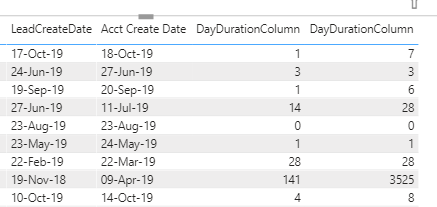
Hello - I would like to, using DAX or mquery, fix the issue I am having below. Trying to sum up the days between when a Lead is created by our salespeople....and when that actual account (from that Lead) gets created.
The 3rd column is correct - acheived by selecting the "do not sum" option in the visualization area. The far right column is what happens if I don't, and just leave it as "summarize".
Is there a way to achieve having this calculated column NOT sum, within the formula itself? Or perhaps can a measure be created instead? Thanks!
Solved! Go to Solution.
Hi @Anonymous ,
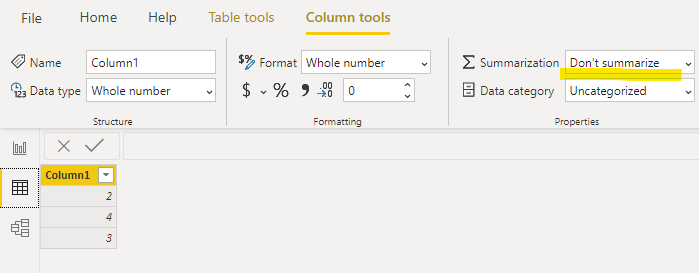
You can go to data view>select the calcualted column>column tools>"dont summarize":
And when you put the column value in a visual you will see:
The valued is not summed up automatically.
Hi @Anonymous ,
You can go to data view>select the calcualted column>column tools>"dont summarize":
And when you put the column value in a visual you will see:
The valued is not summed up automatically.
@Anonymous
this behaviour ais explained by that fact that you have a few rows with the same pair Lead - Acc dates.
you need to define business logic how do you want to calculate cases with two identical date's pairs
| User | Count |
|---|---|
| 55 | |
| 37 | |
| 23 | |
| 17 | |
| 17 |
| User | Count |
|---|---|
| 69 | |
| 58 | |
| 39 | |
| 21 | |
| 21 |