Don't miss your chance to take the Fabric Data Engineer (DP-600) exam for FREE! Find out how by attending the DP-600 session on April 23rd (pacific time), live or on-demand.
Learn moreNext up in the FabCon + SQLCon recap series: The roadmap for Microsoft SQL and Maximizing Developer experiences in Fabric. All sessions are available on-demand after the live show. Register now
Hi All,
I have two calculated columns and they are giving me surprising different results for a simple datediff function:
Days to Expire = DATEDIFF([Today],SQLViewName[Expiration Date],DAY)
Expiration Status = IF(SQLViewName[Expiration Date]=BLANK(),"NA",IF(SQLViewName[Days to Expire]<0,"Expired",IF(SQLViewName[Days to Expire]<=29,"Expiring in <30 days",IF(SQLViewName[Days to Expire]<=59,"Expiring in <60 days","Expiring in >=60 days"))))
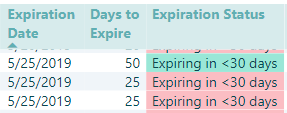
Row 1 is for some weird reason showing "Days to Expire" as 50 days to expire (when it should be 25 days like row 2 & 3) ... The "Expiration Status" column correctly categorizes but "Days to Expire" has it wrong!
Solved! Go to Solution.
So a colleague helped me realize that the value was being summarized! I had to select 'Don't Summarize' and it resolved the issue. Still trying to understand what field(s) was it picking to summarize on as each rows were different in some attributes.
Hi @cyclist007 ,
I was not able to replicate this problem on my side. Please clear the cache and refresh dataset for a try. And make sure your Power BI desktop is updated to the latest version.
If problem persists, would you share the sample .pbix file for check. Do mask sensitive data before sharing.
Regards,
Yuliana Gu
Yeah its not easily replicable as i also see this happening for only one-off cases. Have tried changing the connection to an Excel file (after exporting data to excel ... the formula works fine in Excel so data is not corrupted) but still shows incorrectly in just one of the calculated columns i Power BI Desktop (Aug 2018 Report server version - cannot upgrade as client is using same version).
How does one clear Cache?
So a colleague helped me realize that the value was being summarized! I had to select 'Don't Summarize' and it resolved the issue. Still trying to understand what field(s) was it picking to summarize on as each rows were different in some attributes.
If you have recently started exploring Fabric, we'd love to hear how it's going. Your feedback can help with product improvements.
A new Power BI DataViz World Championship is coming this June! Don't miss out on submitting your entry.
Share feedback directly with Fabric product managers, participate in targeted research studies and influence the Fabric roadmap.
| User | Count |
|---|---|
| 48 | |
| 45 | |
| 41 | |
| 20 | |
| 18 |
| User | Count |
|---|---|
| 69 | |
| 64 | |
| 32 | |
| 31 | |
| 27 |