Join us at FabCon Atlanta from March 16 - 20, 2026, for the ultimate Fabric, Power BI, AI and SQL community-led event. Save $200 with code FABCOMM.
Register now!Get Fabric certified for FREE! Don't miss your chance! Learn more
I took a date in a Database with the year 18,19,20,21,22 and
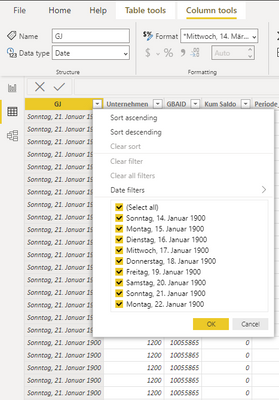
i load it but it came as decimal but when i try to convert these to Date it comes out as 1900.
and i don't know how to get the right date.
Here is the date but it is in decimal number but when i try to change it to date format it is giving me something else as shown below;
Thanks in Advance
Solved! Go to Solution.
Hi @Anonymous ,
Please try below steps:
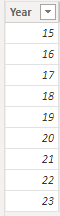
1. below is my test table
Table:
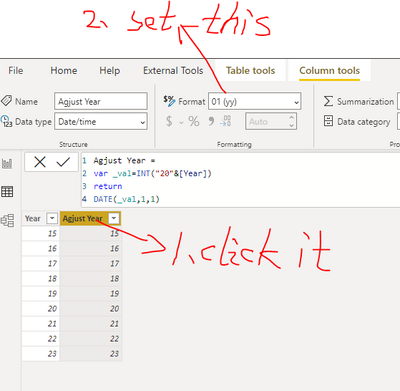
2. add a new column with below dax formula
Agjust Year =
VAR _val = INT ( "20" & [Year] ) RETURN DATE ( _val, 1, 1 )
3. set the format in Power BI Desktop
Please refer the attached .pbix file.
Best regards,
Community Support Team_Binbin Yu
If this post helps, then please consider Accept it as the solution to help the other members find it more quickly.
Hi @Anonymous ,
Please try below steps:
1. below is my test table
Table:
2. add a new column with below dax formula
Agjust Year =
VAR _val = INT ( "20" & [Year] ) RETURN DATE ( _val, 1, 1 )
3. set the format in Power BI Desktop
Please refer the attached .pbix file.
Best regards,
Community Support Team_Binbin Yu
If this post helps, then please consider Accept it as the solution to help the other members find it more quickly.
@Anonymous is there a possibility to have the date with the Month included(i.e MM:JJJJ) or in this format (DD:MM:JJJJ). Thanks in advance
It is working. Thank you very much
Share feedback directly with Fabric product managers, participate in targeted research studies and influence the Fabric roadmap.
Check out the January 2026 Power BI update to learn about new features.
| User | Count |
|---|---|
| 68 | |
| 59 | |
| 47 | |
| 20 | |
| 15 |
| User | Count |
|---|---|
| 105 | |
| 102 | |
| 38 | |
| 27 | |
| 26 |