cancel
Showing results for 
Search instead for 
Did you mean: 

The Power BI Data Visualization World Championships is back! Get ahead of the game and start preparing now! Learn more

Reply
Anonymous
Not applicable

Date table - Relationship NOT Working

Hi all,


I am trying to create a relation to a Date Table and use Time intelligence functions, but it looks like there is some issue with the relationship.


I have looked into many similiar issues, but didn't found a solution. I have the feeling it is something with the dates in my Fact table. Please help me as I have s


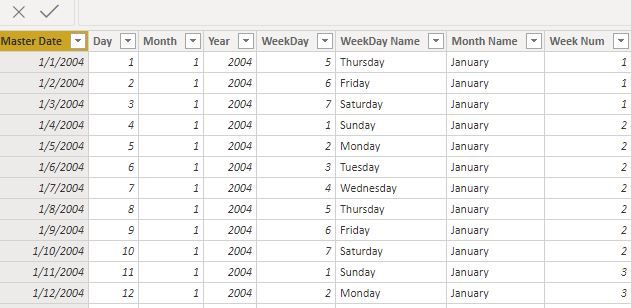
Here is the Date Table, Master Date formatted as Date:


1.JPG


Here is the Fact Table, with the Date column "Time level 2" formatted the same way:


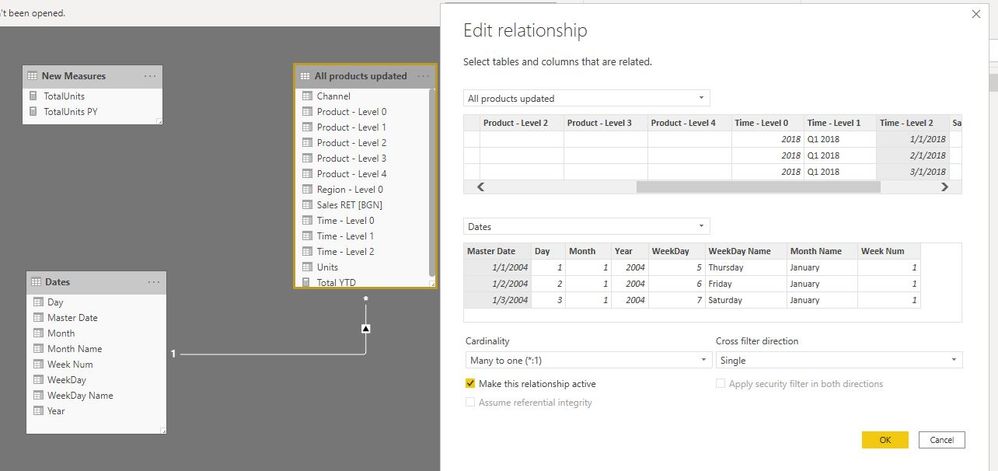
Here is the 1toMany relationship:


3.JPG


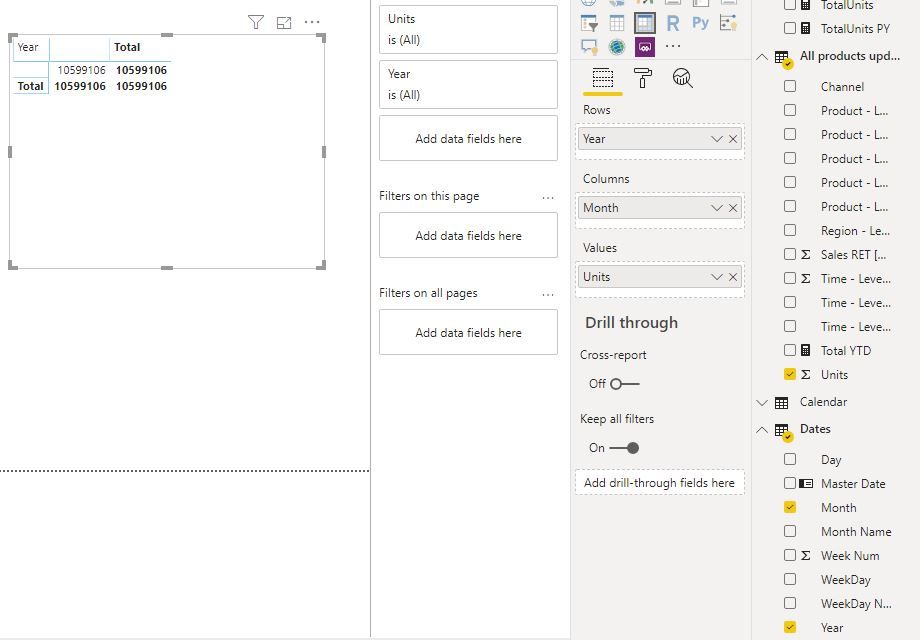
Here is what happens when I try to create as simple matrix:


4.JPG


1 ACCEPTED SOLUTION
amitchandak
Super User
Super User

One of the following

1. date calendar does not have all the dates

2. The transaction table date has time but shown in the date format. So change the format and to date with time and check. It  has time to create a new date column date = table[datetime].date


Share with Power BI Enthusiasts: Full Power BI Video (20 Hours) YouTube
Microsoft Fabric Series 60+ Videos YouTube
Microsoft Fabric Hindi End to End YouTube

View solution in original post

3 REPLIES 3
amitchandak
Super User
Super User

One of the following

1. date calendar does not have all the dates

2. The transaction table date has time but shown in the date format. So change the format and to date with time and check. It  has time to create a new date column date = table[datetime].date


Share with Power BI Enthusiasts: Full Power BI Video (20 Hours) YouTube
Microsoft Fabric Series 60+ Videos YouTube
Microsoft Fabric Hindi End to End YouTube
Anonymous
Not applicable

Hi, 


I am facing similar issues.  I have created a separte date table using calendar auto function and marked the date column in the date table as the date table.  The fact table has multiple date columns with time stamp.  I have changed the date columns in the fact table to date only format and connected it with the date table.  Even then the relationship didnt work.  I also tried modifying the date column in the date table to date/time even then i am facing the similar issues of getting the matrix as mentioned in the post above.  Can you please suggest what you meant when you referred to new date column date = table[datetime].date.  I also checked whether all the dates are there in the date table.  Even the dates are there since its created using calendar auto function.


Any other suggestion would help.


Thanks & Regards,


Padmaja 

Thanks 

Anonymous
Not applicable

Thanks. I have looked in the calendar, but at the end it was missing values for 2020. How I didn't see that...


Helpful resources

Announcements
Power BI DataViz World Championships

Power BI Dataviz World Championships

The Power BI Data Visualization World Championships is back! Get ahead of the game and start preparing now!

December 2025 Power BI Update Carousel

Power BI Monthly Update - December 2025

Check out the December 2025 Power BI Holiday Recap!

FabCon Atlanta 2026 carousel

FabCon Atlanta 2026

Join us at FabCon Atlanta, March 16-20, for the ultimate Fabric, Power BI, AI and SQL community-led event. Save $200 with code FABCOMM.