
Learn from the best! Meet the four finalists headed to the FINALS of the Power BI Dataviz World Championships! Register now
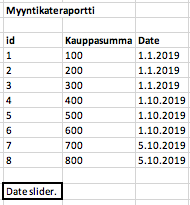
Hi, I have this kind of table which includes € column (kauppasumma) and date column (Date) and then I have a date slider where I pick start date and end date.
(Date column is related with Date table)
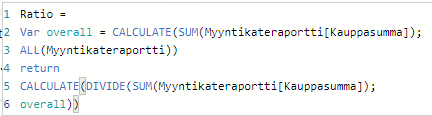
I'm calculating ratio and this function works fine:
But problem is that this function counts all values but doesn't notice my date slider. I would like to count January's ratio but how do I do it?
Thank you!
Solved! Go to Solution.
HI @jussiwaisto ,
So you mean you want to use current value to compare with selected values? If this is a case, you can consider using 'allselected' function to replace 'all' function, it will filtered your records based on current filters.
Ratio =
DIVIDE (
SUM ( Table[Amount] ),
CALCULATE ( SUM ( Table[Amount] ), ALLSELECTED ( Table ) )
)
Regards,
Xiaoxin Sheng
HI @jussiwaisto ,
So you mean you want to use current value to compare with selected values? If this is a case, you can consider using 'allselected' function to replace 'all' function, it will filtered your records based on current filters.
Ratio =
DIVIDE (
SUM ( Table[Amount] ),
CALCULATE ( SUM ( Table[Amount] ), ALLSELECTED ( Table ) )
)
Regards,
Xiaoxin Sheng
| User | Count |
|---|---|
| 54 | |
| 37 | |
| 27 | |
| 18 | |
| 16 |
| User | Count |
|---|---|
| 69 | |
| 57 | |
| 38 | |
| 21 | |
| 21 |