cancel
Showing results for 
Search instead for 
Did you mean: 

The Power BI Data Visualization World Championships is back! Get ahead of the game and start preparing now! Learn more

Reply
Elsie14
Advocate I
Advocate I

Date settings in Power BI

I have a problem with the date settings in Power BI. Currently I have a dataset which have two colums with the data type "Date", namely LastLogonDate and CreationDate.


In my report I have filtered on the LastlogonDate, where the data looks something like this MM/DD/YYYY. However in some cases it also reads it like DD/MM/YYYY, which result in lastlogdates that are in the future (for example 1st November 2017).  I have already changed the Locale to English (United States) as describe in blogpost (without result):


https://community.powerbi.com/t5/Desktop/How-to-change-the-date-format/td-p/40460


So 3/29/2017  is the 29th of March in my report (correct). However this 1/11/2017 is seen as the first of November 2017 (incorrect).


Does somebody else has this problem too or does anyone know the solution to this problem?


5 REPLIES 5
MarcelBeug
Community Champion
Community Champion

What data type is your input: text or date alteady?


Did you add "en-US" with every data type change to date?


Can you share some relevant parts of your code?


Are you refering to DAX or to Power Query?

Specializing in Power Query Formula Language (M)

What data type is your input: text or date alteady?


The original input was of type text. I have converted it to type date.


Did you add "en-US" with every data type change to date?


What do you mean with this? I can't give this parameter when I change the type in the editor.


Can you share some relevant parts of your code?


This is the code where I changed the type of these columns (from text->date/time and from date/time to date):


    #"Changed Type2" = Table.TransformColumnTypes(#"Replaced Value",{{"LastLogonDate - Copy", type datetime}, {"CreationDate - Copy", type datetime}}),
    #"Changed Type3" = Table.TransformColumnTypes(#"Changed Type2",{{"CreationDate - Copy", type date}, {"LastLogonDate - Copy", type date}}),


Are you refering to DAX or to Power Query?


Power Query

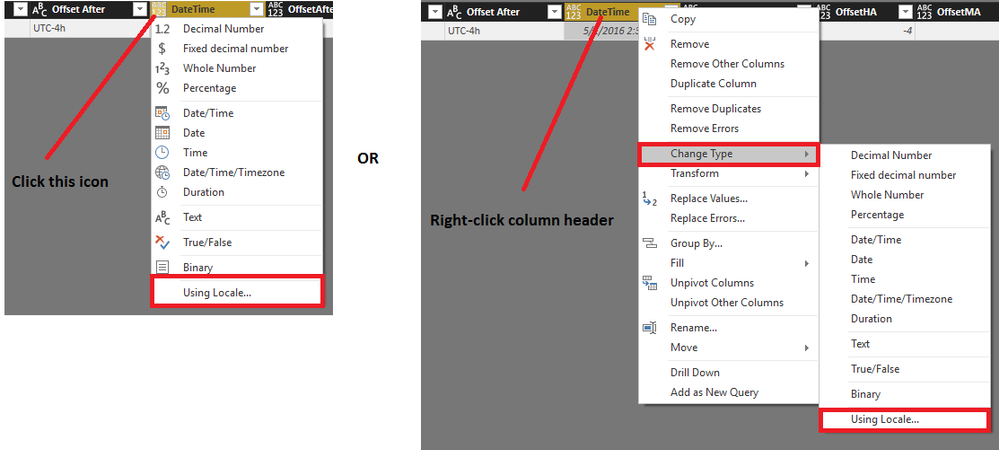
Well, you can supply the culture code with every type change, but you must know where to find it.


Change type using locale.png


Or you can adjust the generated code by supplying ", <locale>"  just before the last ")":


    #"Changed Type2" = Table.TransformColumnTypes(#"Replaced Value",{{"LastLogonDate - Copy", type datetime}, {"CreationDate - Copy", type datetime}}, "en-US"),
    #"Changed Type3" = Table.TransformColumnTypes(#"Changed Type2",{{"CreationDate - Copy", type date}, {"LastLogonDate - Copy", type date}}, "en-US"),
Specializing in Power Query Formula Language (M)

I'm sorry, my last line of the editor was indeed:


#"Changed Type with Locale" = Table.TransformColumnTypes(#"Renamed Columns2", {{"LastLogonDay", type date}}, "en-US")


Unfortunately, also without results. Still reads it as 1st of November 2017:(

It's hard to tell, but I found a possible clue:  would it be possible that only the DD/YYYY part of the date is converted to date, e.g. after data transformation, especially splitting?


I ran the following code, which returns November 1, 2017 for "11/2017" (and errors for "13/1/2017"):


let
    Source = {"1/13/2017", "13/1/2017", "11/2017", "1/11/2017"},
    #"Converted to Table" = Table.FromList(Source, Splitter.SplitByNothing(), null, null, ExtraValues.Error),
    #"Changed Type with Locale" = Table.TransformColumnTypes(#"Converted to Table", {{"Column1", type date}}, "en-US"),
    #"Inserted Month Name" = Table.AddColumn(#"Changed Type with Locale", "Month Name", each Date.MonthName([Column1]), type text)
in
    #"Inserted Month Name"
Specializing in Power Query Formula Language (M)

Helpful resources

Announcements
November Power BI Update Carousel

Power BI Monthly Update - November 2025

Check out the November 2025 Power BI update to learn about new features.

Fabric Data Days Carousel

Fabric Data Days

Advance your Data & AI career with 50 days of live learning, contests, hands-on challenges, study groups & certifications and more!

FabCon Atlanta 2026 carousel

FabCon Atlanta 2026

Join us at FabCon Atlanta, March 16-20, for the ultimate Fabric, Power BI, AI and SQL community-led event. Save $200 with code FABCOMM.

Top Solution Authors
Top Kudoed Authors