cancel
Showing results for 
Search instead for 
Did you mean: 

The Power BI Data Visualization World Championships is back! Get ahead of the game and start preparing now! Learn more

Reply
Anonymous
Not applicable

Date range not available - Date Slicer

I am working on a large report that will be launched company wide. They have requested a between date slicer. I applied this slicer to the report and it works fine as long as nothing is filtered on the page. However, once drilled through from the landing page, the slicer just disappears completely and leaves a blank space. I tried to use a page filter instead of drilling through and the slicer gives this error message "data range not available". I'm not sure where the issue is stemming from. Data type does = Da

7 REPLIES 7
Shishir22
Solution Sage
Solution Sage

HI @Anonymous ,


Can you please try using date dimension having all the dates from max date to min date of data.

It might be possible that you are not having that date in data and hence giving error.


Just give relationship to date dimension and try pulling slicer from date dimenson insted taking it from table directly.


If it fulfils your requirement, please mark it as solution.


Thanks!

Cheers,
Shishir
Anonymous
Not applicable

Unfortunately we don't have just one main calendar table hooked up to all of the other tables. there are too many different dates on all of the tables, ie invoice date, due date, etc. it's just weird that it shows when everything is selected but not when filtered down. 

@Anonymous - It might be possible some filter is getting passed as a drillthrough parameter which is resulting the issue.


Can you please check all the drill through parameters passed on the landing page. Extra drill through parameters should be in etalic font. Can you please go ahead and try removing it one by one?


Thanks! 

Cheers,
Shishir
Anonymous
Not applicable

It remains blank until I remove the project name/number filter which then has the table show all of the data. there are no drill through date fields being passed through. 

So its because of project name/no field/table. You need to check the data data for that specific peoject name. Also check relationship of table from where this field is coming.


Without PBIX its very difficult to understand complete scenario. Maybe you can share after hiding sensitive data.


Thanks! 

Cheers,
Shishir
KayceVC
Helper II
Helper II

How is your Date table associated with the table it is filtering? What is the relationship?

Anonymous
Not applicable

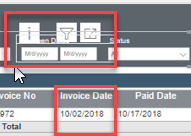
The date field I'm using is actually part of the accounts payable table that is displaying the date in the table itself. 

jdaily83_0-1613764224507.png


Helpful resources

Announcements
Power BI DataViz World Championships

Power BI Dataviz World Championships

The Power BI Data Visualization World Championships is back! Get ahead of the game and start preparing now!

December 2025 Power BI Update Carousel

Power BI Monthly Update - December 2025

Check out the December 2025 Power BI Holiday Recap!

FabCon Atlanta 2026 carousel

FabCon Atlanta 2026

Join us at FabCon Atlanta, March 16-20, for the ultimate Fabric, Power BI, AI and SQL community-led event. Save $200 with code FABCOMM.