
cancel
Showing results for 
Search instead for 
Did you mean: 

Get Fabric Certified for FREE during Fabric Data Days. Don't miss your chance! Request now

Reply
arne3763
Regular Visitor

Date from Dataset not shown as type Date

Hi,

I did create a  streaming dataset with type Date/Time: "Date" :"2019-01-30T12:24:46.618Z",

Above format is set by default and cannot be edited.
 
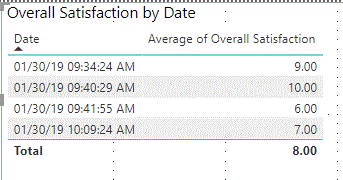
In PowerBI Desktop, the column is not recognised as date format.
date.GIF
Resulting, I cannot select year, month, day etc.
Graphs are therefore shown per timestamp (second).
table.GIFgrapf.GIF
 
How to get a measure for e.g. year, month.
 
Is it possible to change the format in the dataset?
Or how could a measure look like?
 
I did already try a lot but failed.
 
Support very appreciated- tks a lot.
 
Arne
 
 
2 REPLIES 2
v-yulgu-msft
Microsoft Employee
Microsoft Employee

Hi @arne3763,


You could check the data type of this "Date" column under Modeling tab in desktop. If it is formatted as Text, please change it to "Date/Time".


Regards,

Yuliana Gu

Community Support Team _ Yuliana Gu
If this post helps, then please consider Accept it as the solution to help the other members find it more quickly.

Hi Yuliana,

thank you for the hint.

However, changing data types is not possible when using a streaming dataset.

Then the field is not enabled.

BR
Arne

Helpful resources

Announcements
November Power BI Update Carousel

Power BI Monthly Update - November 2025

Check out the November 2025 Power BI update to learn about new features.

Fabric Data Days Carousel

Fabric Data Days

Advance your Data & AI career with 50 days of live learning, contests, hands-on challenges, study groups & certifications and more!

FabCon Atlanta 2026 carousel

FabCon Atlanta 2026

Join us at FabCon Atlanta, March 16-20, for the ultimate Fabric, Power BI, AI and SQL community-led event. Save $200 with code FABCOMM.

Top Solution Authors
Top Kudoed Authors