cancel
Showing results for 
Search instead for 
Did you mean: 

Join the FabCon + SQLCon recap series. Up next: Power BI, Real-Time Intelligence, IQ and AI, and Data Factory take center stage. All sessions are available on-demand after the live show. Register now

Reply
PDeGaris
New Member

Date format issues

Hi,

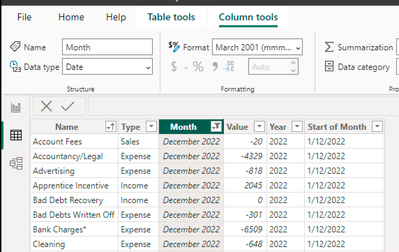
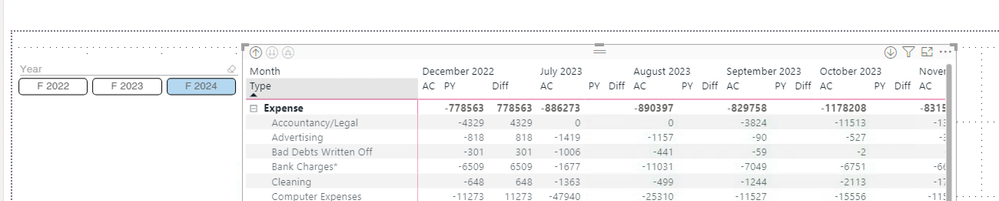
I have a date formatting issue - BI is recognising a date (Dec-2022) as both Dec-2022 and Dec- 2023?  P & L matrix is showing Dec-2022 in a filtered visual for both FY 2022 and FY 2023.  AC values showing when filtered for FY 2023 and no PY value, so BI seems to recognize the date correctly but when filtered for FY 2024, Dec 2022 is displayed incorrectly but with the correct PY values and no AC value - so BI seems to be recognizing as Dec-2023? The date is showing correctly in the data table and does not appear to be duplicated.  The data is coming from an excel spreadsheet built with power query from a monthly data dump into a spreadsheet in which the date seems to be correct also.

Thanks in advance


Screen Shot 2023-12-10 at 7.46.25 am.pngScreen Shot 2023-12-10 at 7.46.59 am.pngScreen Shot 2023-12-10 at 7.46.12 am.png

1 ACCEPTED SOLUTION

Thanks HotChilli,


I seem to have solved the issue just now - the date our financial software exports as the month is the 12/23/22 (mm/dd/yy) (seems the 23rd is an odd day to pick but that's another issue) - for some reason any spreadsheets with a 2022 year date, BI was reading the year as 23.  Changing the date format in the original excel files to dd/mm/yyyy fixed the problem.

Thanks Anyway.

View solution in original post

2 REPLIES 2
HotChilli
Community Champion
Community Champion

There's not enough detail in the question to help you.  Can you provide the pbix please?

Thanks HotChilli,


I seem to have solved the issue just now - the date our financial software exports as the month is the 12/23/22 (mm/dd/yy) (seems the 23rd is an odd day to pick but that's another issue) - for some reason any spreadsheets with a 2022 year date, BI was reading the year as 23.  Changing the date format in the original excel files to dd/mm/yyyy fixed the problem.

Thanks Anyway.

Helpful resources

Announcements
April Power BI Update Carousel

Power BI Monthly Update - April 2026

Check out the April 2026 Power BI update to learn about new features.

New to Fabric survey Carousel

New to Fabric Survey

If you have recently started exploring Fabric, we'd love to hear how it's going. Your feedback can help with product improvements.

Power BI DataViz World Championships carousel

Power BI DataViz World Championships - June 2026

A new Power BI DataViz World Championship is coming this June! Don't miss out on submitting your entry.

FabCon and SQLCon Highlights Carousel

FabCon &SQLCon Highlights

Experience the highlights from FabCon & SQLCon, available live and on-demand starting April 14th.