This time we’re going bigger than ever. Fabric, Power BI, SQL, AI and more. We're covering it all. You won't want to miss it.
Learn moreDid you hear? There's a new SQL AI Developer certification (DP-800). Start preparing now and be one of the first to get certified. Register now
Hi All,
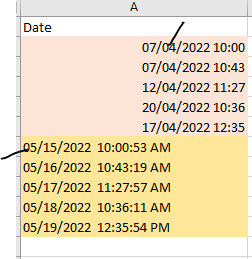
facing date format issue like one file (MM/DD/YY) another one file contains (DD/MM/YY) how to change as a same format in powerbi.
examble :
In Power Query, right-click the column and 'Change Type' ->using Locale, and you pick the date format you want to transfer from (for example, UK or US).
From the picture I think you have appended the 2 files and the column is text so you need to do this before appending the 2 files.
Hi @Varan_15
Do you know which files contain dates in which format? If you don't then this will be hard/impossible as is. Ideally you should be getting the dates in the same format. Failing that you need to deal with them separately, e.g. US format dates converted separately to UK dates.
Even if you tried something like
try Date.From([Dates] , "en-UK") otherwise Date.From([Dates] , "en-US")
it's not perfect because it can't tell if 07/04/2022 is April 7th or July 4th.
Regards
Phil
Proud to be a Super User!
Check out the April 2026 Power BI update to learn about new features.
Sign up to receive a private message when registration opens and key events begin.
If you have recently started exploring Fabric, we'd love to hear how it's going. Your feedback can help with product improvements.
| User | Count |
|---|---|
| 35 | |
| 32 | |
| 27 | |
| 23 | |
| 16 |
| User | Count |
|---|---|
| 65 | |
| 50 | |
| 30 | |
| 25 | |
| 24 |