cancel
Showing results for 
Search instead for 
Did you mean: 

Try your skills in the Power BI Dataviz World Championship! Round one ends June 26. Join now

Reply
RenataOG30s
Frequent Visitor

Date format issue

Hi everyone, can you please help me with the issue I'm facing.

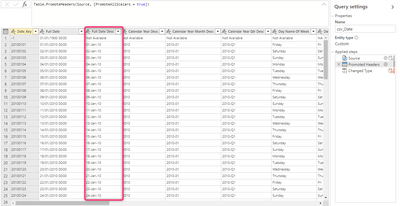
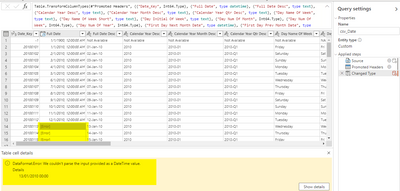
My Date table is a csv file and it works completely fine in PBI Desktop, but I'm re-creating the same dataset as a Dataflow, but for some reason, the column is given the highlighted error message, which I don't get on the desktop. What am I missing here, please?

Below is all ok, but the second pic shows the error after I change the column to 'date and time' type.

RenataOG30s_1-1636991283471.png


RenataOG30s_2-1636991394555.png


Thanks in advance,

R


4 REPLIES 4
Anonymous
Not applicable

Hello, I am facing the same issue. Any help how was it resovled. ??

v-jingzhang
Community Support
Community Support

Hi @RenataOG30s 


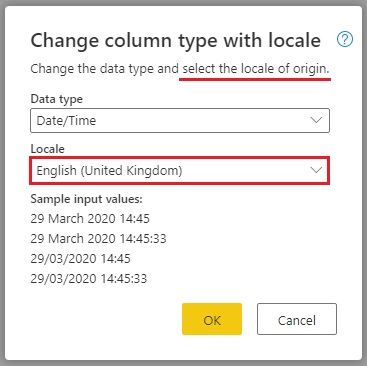
Change type by using locale should work, you need to select English (United Kingdom) here as it expects the locale of original data. After changing column type, you will see data in the format which is identical with your account/browser settings. I guess your account/browser settings is using English(United States) so you will get result in that format. That's also why you have this error initially when changing data type. 

21111802.jpg


If you want to see datatime in English (United Kingdom) format, you could refer to https://nform.com.au/how-to-change-the-date-format-in-the-power-bi-service/ 


Best Regards,
Community Support Team _ Jing
If this post helps, please Accept it as Solution to help other members find it.

selimovd
Most Valuable Professional

Hey @RenataOG30s ,


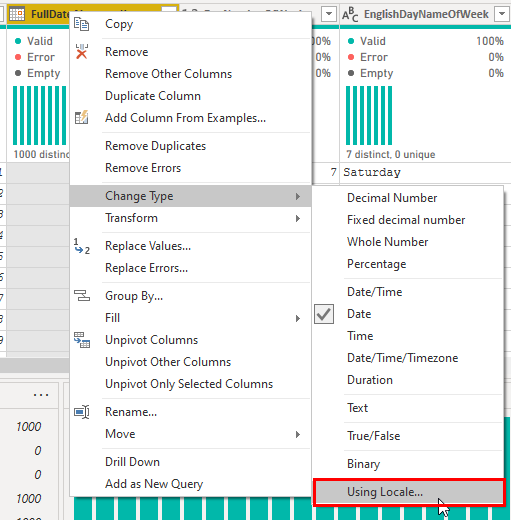
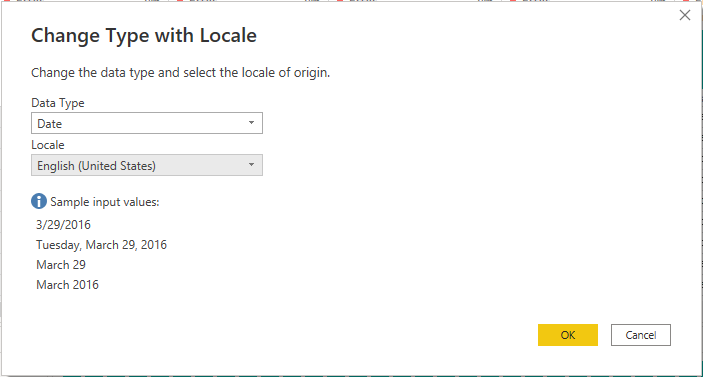
there seems to be a problem with the conversion from the date. Make sure before any other conversion in your data flow, that you chose "Change type" --> "Using Locale"

selimovd_0-1636992133151.png


Then you have to choose the format of the date, most likely it's from the United States:

selimovd_1-1636992208305.png


Like this Power Query will convert your data as date with the format from US.


If you need any help please let me know.
If I answered your question I would be happy if you could mark my post as a solution ✔️ and give it a thumbs up 👍
 
Best regards
Denis
 

Hi Denis, thank you so much for your reply. Unfortuntely, I tried that and didn't work. It should be English UK. I tried changing the regional settings, but no success.

Helpful resources

Announcements
Fabric Data Days is here Carousel

Fabric Data Days 2026

Don't miss out on Data Days, June 15 through August 7. Learn Fabric, Power BI, SQL, AI and more.

Power BI DataViz World Championships carousel

Power BI DataViz World Championships - June 2026

A new Power BI DataViz World Championship is coming this June! Don't miss out on submitting your entry.