Join us at FabCon Atlanta from March 16 - 20, 2026, for the ultimate Fabric, Power BI, AI and SQL community-led event. Save $200 with code FABCOMM.
Register now!The Power BI Data Visualization World Championships is back! It's time to submit your entry. Live now!
Hi,
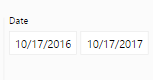
I am wanting to use this date filter in my reports:
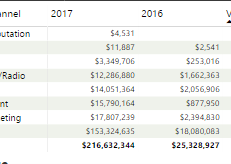
I am also wanting to do a Year over Year comparison with the data after the date is selected:
As you can see, I filtered the October 17, 2016 - October 17, 2017; it's given me just that [ NOT year over year ].
Could someone please help in this? If I filter just October 17, 2017; 2016 column goes away 😞
Solved! Go to Solution.
I was sucessfully able to use the SAMEPERIODLASTYEAR function to correct the table visual.
Hi @Anonymous,
1. How do you get the values of 2016/2017? In other words, what's the formula in the second picture?
2. What's the axis in the third picture?
3. If it's possible there is no data for the first row of 2016 in the second picture?
Can you share the pbix file? At least a sample and the formulas.
Best Regards!
Dale
I was sucessfully able to use the SAMEPERIODLASTYEAR function to correct the table visual.
The Power BI Data Visualization World Championships is back! It's time to submit your entry.
Check out the January 2026 Power BI update to learn about new features.
| User | Count |
|---|---|
| 57 | |
| 40 | |
| 27 | |
| 25 | |
| 23 |
| User | Count |
|---|---|
| 127 | |
| 108 | |
| 54 | |
| 39 | |
| 33 |