
cancel
Showing results for 
Search instead for 
Did you mean: 

The Power BI Data Visualization World Championships is back! Get ahead of the game and start preparing now! Learn more

Reply
jalaomar
Helper IV
Helper IV

Date duration and conditions

Hello,


I have two column in my table, Actual start date & Schedule start date 

I would like to combine these 2 column into 1 column based on a condition. IF there is an actual date display that one else Schedule start date.


Once I have that column I would then like to measure the duration of that date compared to today's date.


ProjectIDActualStart ScheduleStart DateValueDuration 
A2022-10-142022-10-102022-10-144
Bnull2022-09-232022-09-2325


anyone who can support?


BR

J

1 ACCEPTED SOLUTION
DataInsights
Super User
Super User

@jalaomar,


Try these calculated columns:


DateValue = COALESCE ( Table1[ActualStart], Table1[ScheduleStart] )
Duration = DATEDIFF ( Table1[DateValue], TODAY(), DAY )


DataInsights_0-1666099251171.png


Did I answer your question? Mark my post as a solution!

Proud to be a Super User!


View solution in original post

5 REPLIES 5
DataInsights
Super User
Super User

@jalaomar,


Try these calculated columns:


DateValue = COALESCE ( Table1[ActualStart], Table1[ScheduleStart] )
Duration = DATEDIFF ( Table1[DateValue], TODAY(), DAY )


DataInsights_0-1666099251171.png


Did I answer your question? Mark my post as a solution!

Proud to be a Super User!


Thanks @DataInsights ! It works


Have another question, now that I have the Duration, I added another measure to give some value based on duration days 

if duration >0 && duration <=7, 1,0 etc.


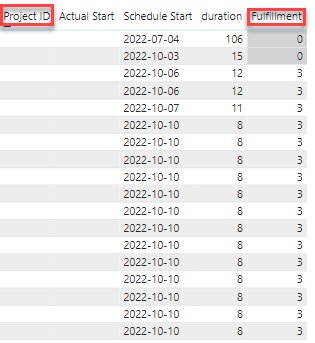
I would like to count number if rows with the value 1 if column Project ID is blank.


so below we have some rows with value 3 and I would like to count number of rows with value 3 where the Project ID rows is blank.


jalaomar_0-1666105848064.png


Hope the question makes sense.


Thanks!


@jalaomar,


You could try a measure like this:


Count Measure = 
CALCULATE (
    COUNTROWS ( Table1 ),
    Table1[Fulfillment] = 1,
    ISBLANK ( Table1[ProjectID] )
)


Make sure ProjectID is actually blank and not an empty string.


Did I answer your question? Mark my post as a solution!

Proud to be a Super User!


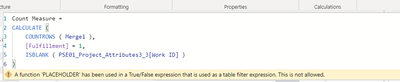
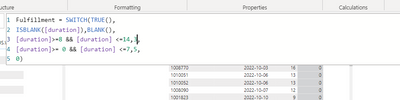
Hi, It didn't exatcly work. I did change the number to match my Fulfillment measure.

jalaomar_0-1666191711535.png


jalaomar_1-1666191766549.png


@jalaomar,


I created calculated columns for Duration and Fulfillment, whereas you are using measures. To filter in a CALCULATE expression as I did in line 4 of [Count Measure], you have to use a column. Another advantage to using calculated columns for Duration and Fulfillment is that you can use them in a slicer/filter.


Did I answer your question? Mark my post as a solution!

Proud to be a Super User!


Helpful resources

Announcements
Power BI DataViz World Championships

Power BI Dataviz World Championships

The Power BI Data Visualization World Championships is back! Get ahead of the game and start preparing now!

November Power BI Update Carousel

Power BI Monthly Update - November 2025

Check out the November 2025 Power BI update to learn about new features.

FabCon Atlanta 2026 carousel

FabCon Atlanta 2026

Join us at FabCon Atlanta, March 16-20, for the ultimate Fabric, Power BI, AI and SQL community-led event. Save $200 with code FABCOMM.