FabCon is coming to Atlanta
Join us at FabCon Atlanta from March 16 - 20, 2026, for the ultimate Fabric, Power BI, AI and SQL community-led event. Save $200 with code FABCOMM.
Register now!- Power BI forums
- Get Help with Power BI
- Desktop
- Service
- Report Server
- Power Query
- Mobile Apps
- Developer
- DAX Commands and Tips
- Custom Visuals Development Discussion
- Health and Life Sciences
- Power BI Spanish forums
- Translated Spanish Desktop
- Training and Consulting
- Instructor Led Training
- Dashboard in a Day for Women, by Women
- Galleries
- Data Stories Gallery
- Themes Gallery
- Contests Gallery
- QuickViz Gallery
- Quick Measures Gallery
- Visual Calculations Gallery
- Notebook Gallery
- Translytical Task Flow Gallery
- TMDL Gallery
- R Script Showcase
- Webinars and Video Gallery
- Ideas
- Custom Visuals Ideas (read-only)
- Issues
- Issues
- Events
- Upcoming Events
Get Fabric Certified for FREE during Fabric Data Days. Don't miss your chance! Request now
- Power BI forums
- Forums
- Get Help with Power BI
- Desktop
- Re: Date column replace to NULL or NA
- Subscribe to RSS Feed
- Mark Topic as New
- Mark Topic as Read
- Float this Topic for Current User
- Bookmark
- Subscribe
- Printer Friendly Page

- Mark as New
- Bookmark
- Subscribe
- Mute
- Subscribe to RSS Feed
- Permalink
- Report Inappropriate Content
Date column replace to NULL or NA
Hi All,
I have a date column which has values 12-31-9999 in a table which I imported to Power BI desktop. I am trying to display NULL or NA for 12-31-9999. I have tried DAX calculation to create new column but it did not work. Can you please let me know how can we change it.
Thanks
Solved! Go to Solution.


- Mark as New
- Bookmark
- Subscribe
- Mute
- Subscribe to RSS Feed
- Permalink
- Report Inappropriate Content
Hi @Anonymous ,
I can just guess what problem you might be facing. I suggest to add some error description in your questions/responses. Sample data and desired outcome clarity is expected to get the answers asap.
Below code works for me:
Replaces = IF(FORMAT(DatesReplace[Dates],"dd-mm-yyyy")="31-12-9999", "NA","GoodDates")
Output was like this:
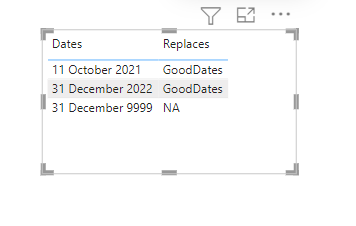
Since we can not compare date with text, so I had to use FORMAT function. You may also need to tweak as may be needed.
Hope it helps.
- Mark as New
- Bookmark
- Subscribe
- Mute
- Subscribe to RSS Feed
- Permalink
- Report Inappropriate Content
Hi @Anonymous ,
The NULL or NA is text type. The data is date type. If we still want to change the column type.The error "Expressions that yield variant data-type cannot be used to define calculated columns" would appear.
We can try @mahenkj2 's way.
Create a measure.
mEASURE = IF(MAX('Table'[date])=DATE(9999,12,31),"NA","GOOD DATES")Or a column.
Column = IF('Table'[date]=DATE(9999,12,31),"NA","GOOD DATES")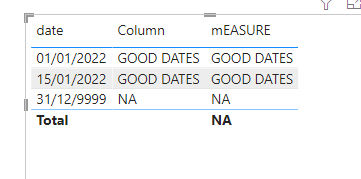
If I have misunderstood your meaning, please provide your pbix file without privacy inforamtion and desired output.
Best Regards
Community Support Team _ Polly
If this post helps, then please consider Accept it as the solution to help the other members find it more quickly.
- Mark as New
- Bookmark
- Subscribe
- Mute
- Subscribe to RSS Feed
- Permalink
- Report Inappropriate Content
Hi @Anonymous ,
The NULL or NA is text type. The data is date type. If we still want to change the column type.The error "Expressions that yield variant data-type cannot be used to define calculated columns" would appear.
We can try @mahenkj2 's way.
Create a measure.
mEASURE = IF(MAX('Table'[date])=DATE(9999,12,31),"NA","GOOD DATES")Or a column.
Column = IF('Table'[date]=DATE(9999,12,31),"NA","GOOD DATES")If I have misunderstood your meaning, please provide your pbix file without privacy inforamtion and desired output.
Best Regards
Community Support Team _ Polly
If this post helps, then please consider Accept it as the solution to help the other members find it more quickly.
- Mark as New
- Bookmark
- Subscribe
- Mute
- Subscribe to RSS Feed
- Permalink
- Report Inappropriate Content
Hi @Anonymous ,
I think, it is not good to have date and text in date column is not a good idea and probably it would not be even possible in DAX. Instead, make another column in the same table comparing with "12-31-9999" and if Yes then NA else say "GoodDates" and use this column as fliter/slicer in your report together with datecolumn you use. The similar thing you can do in Power query as well.
Hope it helps.
- Mark as New
- Bookmark
- Subscribe
- Mute
- Subscribe to RSS Feed
- Permalink
- Report Inappropriate Content
Hi @mahenkj2
I tried creating new column and was comparing using IF condition in DAX. But I was not able to replace the value. Can you please let me know how can I compare and replace?
Thanks
- Mark as New
- Bookmark
- Subscribe
- Mute
- Subscribe to RSS Feed
- Permalink
- Report Inappropriate Content
Hi @Anonymous ,
I can just guess what problem you might be facing. I suggest to add some error description in your questions/responses. Sample data and desired outcome clarity is expected to get the answers asap.
Below code works for me:
Replaces = IF(FORMAT(DatesReplace[Dates],"dd-mm-yyyy")="31-12-9999", "NA","GoodDates")
Output was like this:
Since we can not compare date with text, so I had to use FORMAT function. You may also need to tweak as may be needed.
Hope it helps.


- Mark as New
- Bookmark
- Subscribe
- Mute
- Subscribe to RSS Feed
- Permalink
- Report Inappropriate Content
Hi,
Share the link from where i can download your PBI file.
Regards,
Ashish Mathur
http://www.ashishmathur.com
https://www.linkedin.com/in/excelenthusiasts/
- Mark as New
- Bookmark
- Subscribe
- Mute
- Subscribe to RSS Feed
- Permalink
- Report Inappropriate Content
Thanks for responding 😊. Can you please use excel with column value of '12/31/9999'? Since I cannot share the PBI file.
Thanks
- Mark as New
- Bookmark
- Subscribe
- Mute
- Subscribe to RSS Feed
- Permalink
- Report Inappropriate Content
Hi,
Even if we replace 12/31/9999 in the Date column, there will be mixed data types in that column and that is not adviseable.
Regards,
Ashish Mathur
http://www.ashishmathur.com
https://www.linkedin.com/in/excelenthusiasts/
Helpful resources

Power BI Monthly Update - November 2025
Check out the November 2025 Power BI update to learn about new features.

Fabric Data Days
Advance your Data & AI career with 50 days of live learning, contests, hands-on challenges, study groups & certifications and more!

FabCon Atlanta 2026
Join us at FabCon Atlanta, March 16-20, for the ultimate Fabric, Power BI, AI and SQL community-led event. Save $200 with code FABCOMM.


