Share feedback directly with Fabric product managers, participate in targeted research studies and influence the Fabric roadmap.
Sign up nowGet Fabric certified for FREE! Don't miss your chance! Learn more
New to Power BI and I need to create syntax for a custom column to include:
DAY OF WEEK ONLY as Friday and TIME ARRIVED ONLY as after 5:00:00pm, DAY OF WEEK ONLY as Saturday - no time restriction, and DAY OF WEEK ONLY as Sunday - no time restriction.
Friday after 5:00:00pm would be coded as 1_Fri
Saturday as 2_Sat
Sunday as 3_Sun
All else being coded as 0
I can't seem to get my syntax to work properly. Any help would be greatly appreciated!
Solved! Go to Solution.
@Anonymous
I am not good at M, maybe you can try
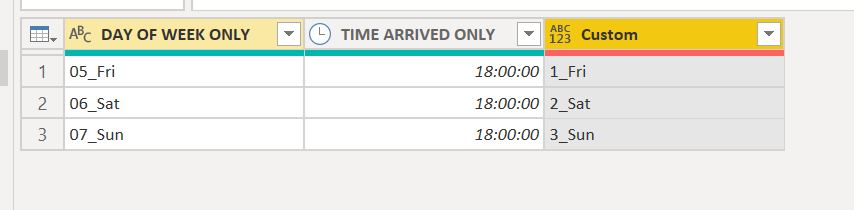
if Text.End([DAY OF WEEK ONLY],3)="Fri" and [TIME ARRIVED ONLY]>#time(17,0,0) then "1_Fri" else if Text.End([DAY OF WEEK ONLY],3)="Sat" then "2_Sat" else if Text.End([DAY OF WEEK ONLY],3)="Sun" then "3_Sun" else 0Proud to be a Super User!
@Anonymous
you can try to use DAX to create a column
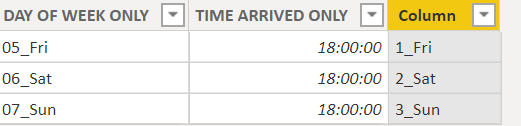
Column = if(right('Table (2)'[DAY OF WEEK ONLY],3)="Fri" && 'Table (2)'[TIME ARRIVED ONLY]>TIME(17,0,0) ,"1_Fri",if(RIGHT('Table (2)'[DAY OF WEEK ONLY],3)="Sat","2_Sat",if(RIGHT('Table (2)'[DAY OF WEEK ONLY],3)="Sun","3_Sun","0")))
Proud to be a Super User!
Hey, @ryan_mayu!
Is there a way to do it through Query instead rather than through DAX? I'm really trying to get a better hold on the if/then statements in Query and I don't understand why I keep getting errors since I know exactly what I need and where the variables are coming from. Thank you, regardless!!!!
@Anonymous
I am not good at M, maybe you can try
if Text.End([DAY OF WEEK ONLY],3)="Fri" and [TIME ARRIVED ONLY]>#time(17,0,0) then "1_Fri" else if Text.End([DAY OF WEEK ONLY],3)="Sat" then "2_Sat" else if Text.End([DAY OF WEEK ONLY],3)="Sun" then "3_Sun" else 0Proud to be a Super User!
If you love stickers, then you will definitely want to check out our Community Sticker Challenge!
Check out the January 2026 Power BI update to learn about new features.
| User | Count |
|---|---|
| 61 | |
| 58 | |
| 45 | |
| 21 | |
| 18 |
| User | Count |
|---|---|
| 119 | |
| 116 | |
| 37 | |
| 34 | |
| 30 |