cancel
Showing results for 
Search instead for 
Did you mean: 

Get Fabric certified for FREE! Don't miss your chance! Learn more

Reply
javieezy
Helper I
Helper I

Date Time problem

Dear all, 


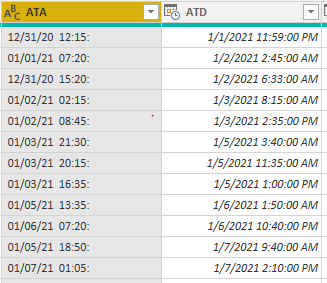
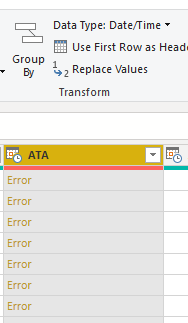
I'm facing a problem now as I input the data from Excel, the column "ATA" shows as Text instead of Date/Time (as "ATD) and cannot be shown as Date/Time. 

javieezy_0-1621884893712.png

javieezy_1-1621885066606.png


But from Excel this two columns are in the same format and can even do calculations. 


Any help would be appreciated. 


Br, 

1 ACCEPTED SOLUTION
Fowmy
Super User
Super User

@javieezy 

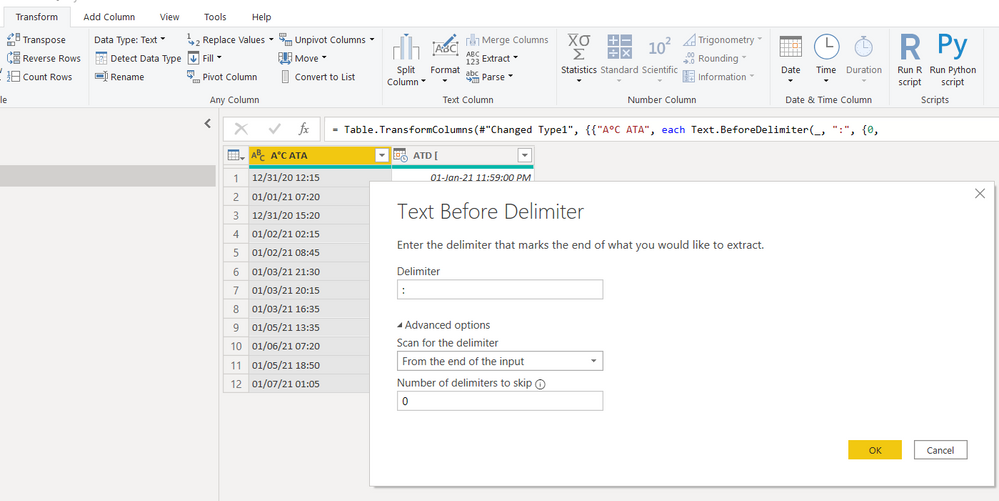
The problem with the column ATA is, it has ":"  at the end, do the following.
Go to: Transform > Extract > Text Before Delimiter and choose the options as I have done

Fowmy_0-1621886413658.png
Then change the column type to Date/Time.
Done

Fowmy_1-1621886519984.png


Did I answer your question? Mark my post as a solution! and hit thumbs up


Subscribe and learn Power BI from these videos

Website LinkedIn PBI User Group

View solution in original post

2 REPLIES 2
Fowmy
Super User
Super User

@javieezy 

The problem with the column ATA is, it has ":"  at the end, do the following.
Go to: Transform > Extract > Text Before Delimiter and choose the options as I have done

Fowmy_0-1621886413658.png
Then change the column type to Date/Time.
Done

Fowmy_1-1621886519984.png


Did I answer your question? Mark my post as a solution! and hit thumbs up


Subscribe and learn Power BI from these videos

Website LinkedIn PBI User Group

Greg_Deckler
Community Champion
Community Champion

@javieezy Can you share the file or at least the code from Advanced Editor in Power Query Editor? Almost looks like the first column is getting truncated for some reason.


Follow on LinkedIn
@ me in replies or I'll lose your thread!!!
Instead of a Kudo, please vote for this idea
Become an expert!: Enterprise DNA
External Tools: MSHGQM
YouTube Channel!: Microsoft Hates Greg
Latest book!:
DAX For Humans

DAX is easy, CALCULATE makes DAX hard...

Helpful resources

Announcements
Join our Fabric User Panel

Join our Fabric User Panel

Share feedback directly with Fabric product managers, participate in targeted research studies and influence the Fabric roadmap.

February Power BI Update Carousel

Power BI Monthly Update - February 2026

Check out the February 2026 Power BI update to learn about new features.

FabCon Atlanta 2026 carousel

FabCon Atlanta 2026

Join us at FabCon Atlanta, March 16-20, for the ultimate Fabric, Power BI, AI and SQL community-led event. Save $200 with code FABCOMM.