cancel
Showing results for 
Search instead for 
Did you mean: 

The Power BI Data Visualization World Championships is back! Get ahead of the game and start preparing now! Learn more

Reply
C3Jacks18
Regular Visitor

Date/Time/Timezone Issue

Good morning, 

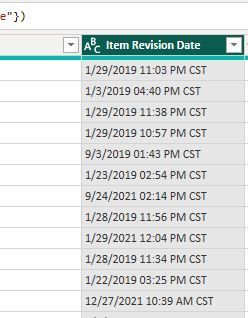
I am new to Microsoft BI and learning the tool now. I uploaded three data files and combined them and I have a date columns that look like this: 01/29/2019 11:03 PM CST

I just want the dates, not the time. Currently, it is in text format but when I go to update it to just date it gives me a error. How do I correct this issue? I been looking all over online and none of the solutions so far I have come across have worked and keCapture.JPGeps giving me a error. 

1 ACCEPTED SOLUTION
v-yueyunzh-msft
Community Support
Community Support

Hi , @C3Jacks18 

According to your description, you just want the Date in your text. Right?

I think you need to solve it in your Power Query Editor. You can use the Text.Split()  to realize it.

You can put this M code in "Advanced Editor" to refer to :

let
    Source = Table.FromRows(Json.Document(Binary.Decompress(Binary.FromText("i45WMtQ3stQ3MjC0VDA0tDIwVgjwVXAODlGK1QFJGUNkDEysTAxQZZA04ZQyQJOyhJkHlDFGkzEyAUoZGSoYGCFLxQIA", BinaryEncoding.Base64), Compression.Deflate)), let _t = ((type nullable text) meta [Serialized.Text = true]) in type table [#"Item Revision Date" = _t]),
    test = Table.TransformColumnTypes(Source,{{"Item Revision Date", type text}}),
    Custom1 = Table.TransformColumns(test,{"Item Revision Date",(x)=> try Date.From(Text.Split(x," "){0})  otherwise null    }),
    #"Changed Type" = Table.TransformColumnTypes(Custom1,{{"Item Revision Date", type date}})
in
    #"Changed Type"

Then we can meet your need:

vyueyunzhmsft_0-1670207799417.png

Thank you for your time and sharing, and thank you for your support and understanding of PowerBI! 


Best Regards,

Aniya Zhang

If this post helps, then please consider Accept it as the solution to help the other members find it more quickly

View solution in original post

4 REPLIES 4
v-yueyunzh-msft
Community Support
Community Support

Hi , @C3Jacks18 

According to your description, you just want the Date in your text. Right?

I think you need to solve it in your Power Query Editor. You can use the Text.Split()  to realize it.

You can put this M code in "Advanced Editor" to refer to :

let
    Source = Table.FromRows(Json.Document(Binary.Decompress(Binary.FromText("i45WMtQ3stQ3MjC0VDA0tDIwVgjwVXAODlGK1QFJGUNkDEysTAxQZZA04ZQyQJOyhJkHlDFGkzEyAUoZGSoYGCFLxQIA", BinaryEncoding.Base64), Compression.Deflate)), let _t = ((type nullable text) meta [Serialized.Text = true]) in type table [#"Item Revision Date" = _t]),
    test = Table.TransformColumnTypes(Source,{{"Item Revision Date", type text}}),
    Custom1 = Table.TransformColumns(test,{"Item Revision Date",(x)=> try Date.From(Text.Split(x," "){0})  otherwise null    }),
    #"Changed Type" = Table.TransformColumnTypes(Custom1,{{"Item Revision Date", type date}})
in
    #"Changed Type"

Then we can meet your need:

vyueyunzhmsft_0-1670207799417.png

Thank you for your time and sharing, and thank you for your support and understanding of PowerBI! 


Best Regards,

Aniya Zhang

If this post helps, then please consider Accept it as the solution to help the other members find it more quickly
djurecicK2
Super User
Super User

Hi @C3Jacks18 ,

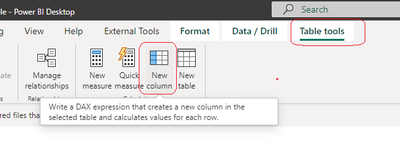
 What I posted was a DAX expression. The error message you posted is from Power Query Editor which uses M code, not DAX.  Please try using that DAX expression to create a new column like below.


djurecicK2_0-1669995795156.png


djurecicK2
Super User
Super User

@C3Jacks18 ,

 I think the "CST" at the end is causing the issue. To remove it, you could create a calculated column like below which you should then be able to change to a date column


NewDate =
MID(TableName[Item Revision Date],1,(LEN(TableName[Item Revision Date])-4))
 
Please accept as solution if this answers the question- thanks!

C3Jacks18_0-1669995366440.png

Not working, getting this error

Helpful resources

Announcements
Power BI DataViz World Championships

Power BI Dataviz World Championships

The Power BI Data Visualization World Championships is back! Get ahead of the game and start preparing now!

December 2025 Power BI Update Carousel

Power BI Monthly Update - December 2025

Check out the December 2025 Power BI Holiday Recap!

FabCon Atlanta 2026 carousel

FabCon Atlanta 2026

Join us at FabCon Atlanta, March 16-20, for the ultimate Fabric, Power BI, AI and SQL community-led event. Save $200 with code FABCOMM.