cancel
Showing results for 
Search instead for 
Did you mean: 

The Power BI Data Visualization World Championships is back! Get ahead of the game and start preparing now! Learn more

Reply
thegekko42
Frequent Visitor

Date Table With Direct Query

Hi


I have 2 direct queries from an sql server with no option to make changes in the source data setup.


One is an order query and the other an invoice query.

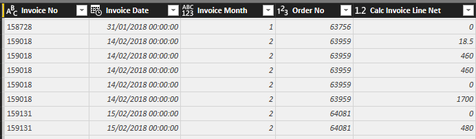
Sales_Data.pngInvoice_Data.png

I need to have a link between them in terms of date/month, but there is no date table in the source data.


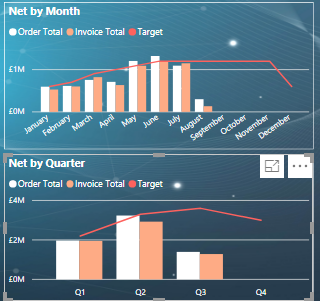
I am aiming for this:

Charts.png


So comparing what has been ordered vs what has been invoiced per month and quarter.

But I can't find a way to achieve this with direct query.


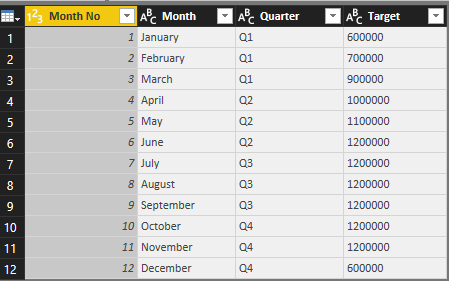
I was tipped to the Composite Models, and I found that it solved the problem perfectly as I simply added this table and linked it to my queries

Month_Data.png

But the Composite Models are only in preview so I need to find a different solution.


How do I replicate the functionality of a date/month table without actually adding the table?

Is there a way around the problem while keeping it as direct query?

4 REPLIES 4
Anonymous
Not applicable

HI @thegekko42,


If you use 'Composite Models', you need to switch to import then you can publish your report with 'many to many' relationship.


If you not want to use that feature, you need to create a bridge table with unique value to link both tables, but this also can't achieve in directquery mode. (calculate table has been disabled in directquery mode)


Regards,

Xiaoxin Sheng

Thank you for your reply Xiaoxin Sheng


Unfortunately I need to run on direct query, as this will need to be Live data.


Is there a measure solution or something like that which can help me bridge the two queries?

Anonymous
Not applicable

Hi @thegekko42,


You can consider to create this table on database side.


Regards,

Xiaoxin Sheng

Thank you for the suggestion, but I can't touch the source data setup.


For now I will keep a master of the model in Composite and then have an import copy for publishing.


It doesn't give me everything I need, but it will have to do until Composite goes Live in October.

Helpful resources

Announcements
Power BI DataViz World Championships

Power BI Dataviz World Championships

The Power BI Data Visualization World Championships is back! Get ahead of the game and start preparing now!

December 2025 Power BI Update Carousel

Power BI Monthly Update - December 2025

Check out the December 2025 Power BI Holiday Recap!

FabCon Atlanta 2026 carousel

FabCon Atlanta 2026

Join us at FabCon Atlanta, March 16-20, for the ultimate Fabric, Power BI, AI and SQL community-led event. Save $200 with code FABCOMM.