cancel
Showing results for 
Search instead for 
Did you mean: 

A new Data Days event is coming soon! This time we’re going bigger than ever. Fabric, Power BI, SQL, AI and more. Don't miss out.

Reply
Anonymous
Not applicable

Date Table Data Mixup

Hi, 


I have created a date table within my report that pulls out the month and year from the given date. 


However, when using filters, the data is not being allocated to the specific year:

Untitled.png

The relationship is O-M, and it cross filters both ways. Where am I making the mistake?


5 REPLIES 5
Anonymous
Not applicable

Hi @Anonymous,

Could you please share sample data of your table and post expected result here?


Thanks,
Lydia Zhang

Anonymous
Not applicable

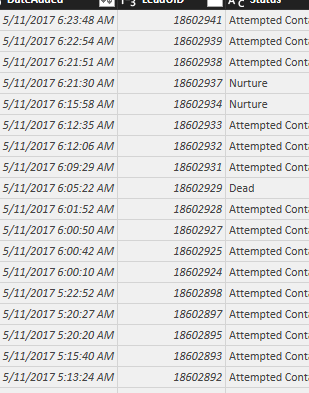
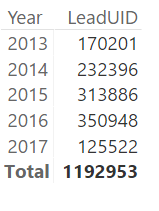
help1.pnghelp2.png


The 1st is example data. The 2nd is what the table looks like without a dateTable being created. 


I want to create a date table, and still achieve these desired results. 

Anonymous
Not applicable

Hi @Anonymous,

The above issue is caused by that you have different DateTime values in the original table, but in your dateTable, I guess that you only have date values or datetime values that only contain 12:00:00. In this scenario, not all the datetime values in your original table match the date values in your dateTable, and you will not get expected result when you drag Year from dateTable.

To solve this issue, create a new column in your original table using the DAX below, make sure that you change date type of the new column in your original table and Date column of dateTable to Date type. Then remove the existing relation between two tables, create a new relationship using this new column and date column in dateTable.

Datecol = DATE(YEAR(Table1[Date]),MONTH(Table1[Date]),DAY(Table1[Date]))
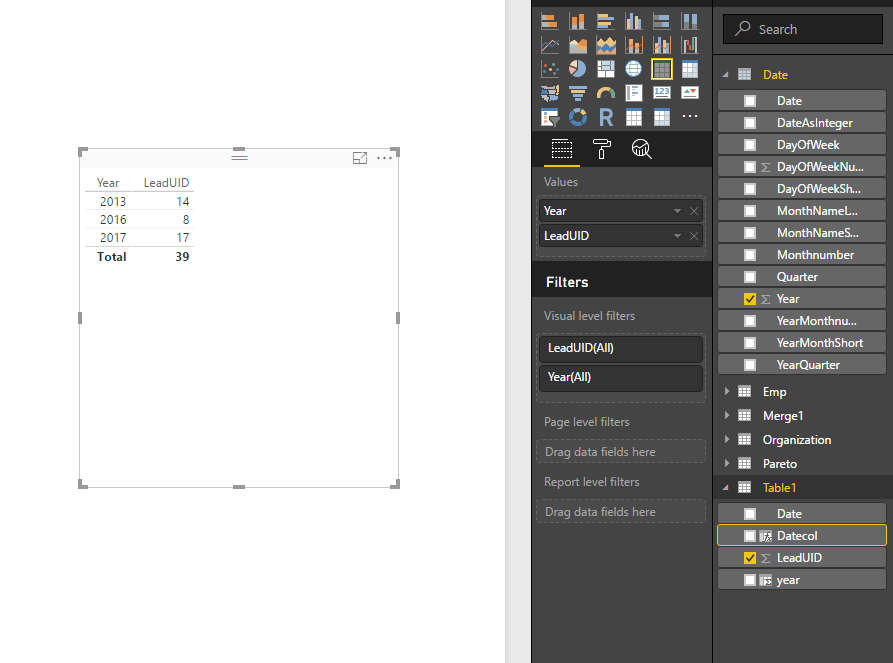
1.PNG


Thanks,
Lydia Zhang

Anonymous
Not applicable

Hi @Anonymous 

So do i need to extract the date for each datetime field in my tables?


What about the possibility to remove the seconds from the datetime table and create a date table with a record for each minute?

Too much data? 


Cheers

Anonymous
Not applicable

@Anonymous

Helpful resources

Announcements
May Power BI Update Carousel

Power BI Monthly Update - May 2026

Check out the May 2026 Power BI update to learn about new features.

Fabric SQL PBI Data Days

Data Days 2026 coming soon!

Sign up to receive a private message when registration opens and key events begin.

New to Fabric survey Carousel

New to Fabric Survey

If you have recently started exploring Fabric, we'd love to hear how it's going. Your feedback can help with product improvements.

Power BI DataViz World Championships carousel

Power BI DataViz World Championships - June 2026

A new Power BI DataViz World Championship is coming this June! Don't miss out on submitting your entry.