Join us at FabCon Atlanta from March 16 - 20, 2026, for the ultimate Fabric, Power BI, AI and SQL community-led event. Save $200 with code FABCOMM.
Register now!The Power BI Data Visualization World Championships is back! Get ahead of the game and start preparing now! Learn more
Solved! Go to Solution.
Hey @DataAnalyst7 ,
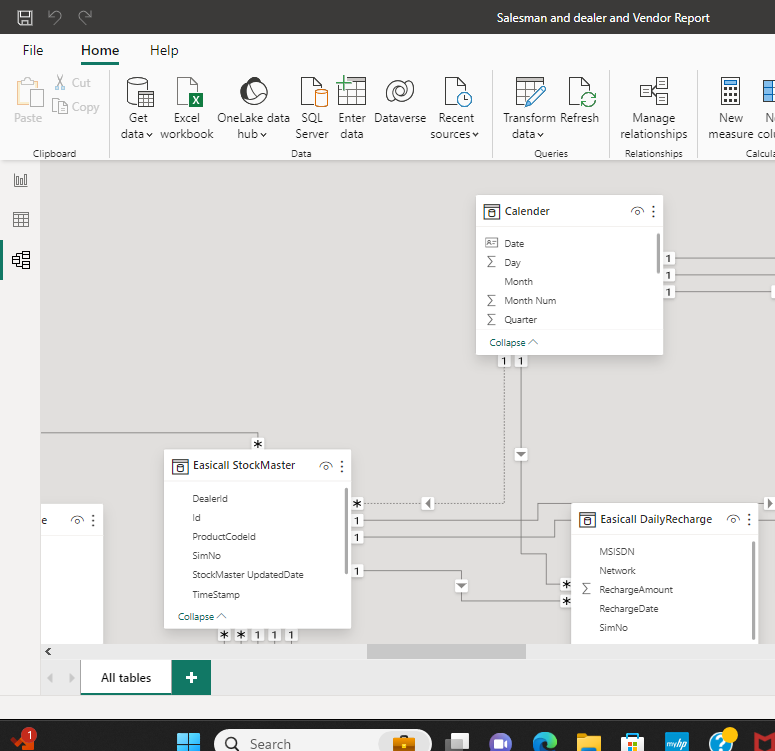
the relationship between the calendar table and the Stock Master table is not active.
Like that it is as if the relationship does not exist. Do a double click on this relationship and make it active. Then it should work.
If you need any help please let me know.
If I answered your question I would be happy if you could mark my post as a solution ✔️ and give it a thumbs up 👍
Best regards
Denis
Blog: WhatTheFact.bi
Follow me: twitter.com/DenSelimovic
Hey @DataAnalyst7 ,
the relationship between the calendar table and the Stock Master table is not active.
Like that it is as if the relationship does not exist. Do a double click on this relationship and make it active. Then it should work.
If you need any help please let me know.
If I answered your question I would be happy if you could mark my post as a solution ✔️ and give it a thumbs up 👍
Best regards
Denis
Blog: WhatTheFact.bi
Follow me: twitter.com/DenSelimovic
Hey @DataAnalyst7 ,
maybe share the file or at least a few screenshots.
We can't imagine what the problem is when you don't give more details.
Best regards
Denis
The Power BI Data Visualization World Championships is back! Get ahead of the game and start preparing now!
Check out the November 2025 Power BI update to learn about new features.
| User | Count |
|---|---|
| 59 | |
| 43 | |
| 42 | |
| 23 | |
| 17 |
| User | Count |
|---|---|
| 190 | |
| 122 | |
| 96 | |
| 66 | |
| 47 |