This is best Fabric, Power BI, SQL and AI community event. How do we know? The last event sold out! Save €200 with code FABCMTY200.
Register nowA new Data Days event is coming soon! This time we’re going bigger than ever. Fabric, Power BI, SQL, AI and more. Don't miss out.
Hi guys!
I'm new to PowerBI and I'd like to know if there is a way to solve that...
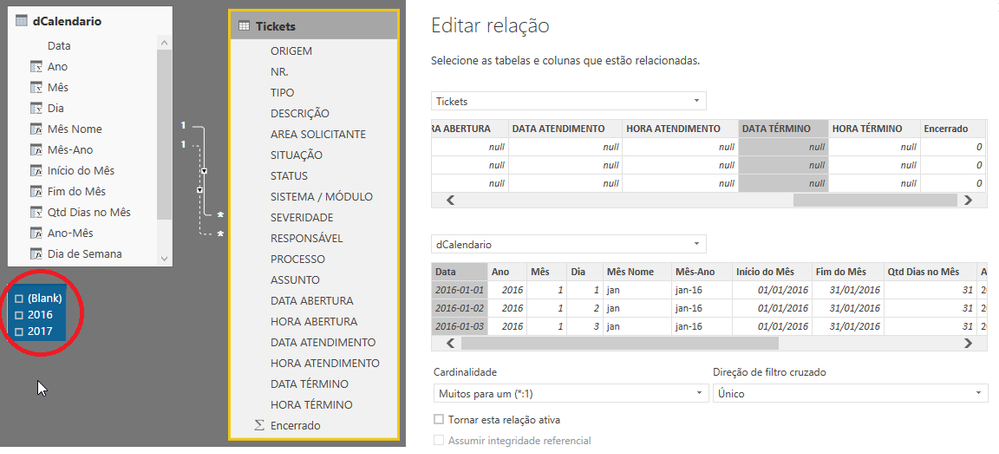
I have a Calendar table and a Tickets table. I need two relationships to calculate Opened/Closed Tickets correctly.
So, I have an active relationship for Open Date and other relationship for Finish Date, but if the Ticket was not closed, Finish Date is null.
The measures are being calculated perfectly, but the problem is when using segmentation I got a Blank option, like below.
Is there a way to not show this blank? How?
Thanks in advance!
Solved! Go to Solution.
Hello @JordanAWARE !
Thanks for your answer.
After trying some solutions I found one that worked fine, but I had to create more tables and relationships, I'm not sure if it is the best solution, but is better than show Blank in the segmentation, because it seems there is something wrong with the database...
Anyway, these steps solved the problem:
1 - I created a new table containing only the Closed Tickets, where the Finish Date is filled;
2 - A relationship between Calendar and Closed Tickets, by Finish Date;
3 - Since I was using only one table in my report and now I'm using two, I had to create some intermediate tables/relationships to filter correcly the data in both tables.
Thanks again.
If you wanted to just hide Blank() from showing in the slicer just drag the field the slicer uses into a report/page filter, select all years then just uncheck blank and it will hide it.
But I dont think thats solving the issue of the blank years being there...
What table is that slicer reading from?
The next option is to try create a calculated column inside the Tickets table --> Year = related('Calender'[year])
and use this column to slice the year
Hello @JordanAWARE !
Thanks for your answer.
After trying some solutions I found one that worked fine, but I had to create more tables and relationships, I'm not sure if it is the best solution, but is better than show Blank in the segmentation, because it seems there is something wrong with the database...
Anyway, these steps solved the problem:
1 - I created a new table containing only the Closed Tickets, where the Finish Date is filled;
2 - A relationship between Calendar and Closed Tickets, by Finish Date;
3 - Since I was using only one table in my report and now I'm using two, I had to create some intermediate tables/relationships to filter correcly the data in both tables.
Thanks again.
Check out the May 2026 Power BI update to learn about new features.
Sign up to receive a private message when registration opens and key events begin.
If you have recently started exploring Fabric, we'd love to hear how it's going. Your feedback can help with product improvements.
| User | Count |
|---|---|
| 27 | |
| 26 | |
| 22 | |
| 19 | |
| 17 |
| User | Count |
|---|---|
| 48 | |
| 46 | |
| 41 | |
| 21 | |
| 18 |