
Share feedback directly with Fabric product managers, participate in targeted research studies and influence the Fabric roadmap.
Sign up nowGet Fabric certified for FREE! Don't miss your chance! Learn more
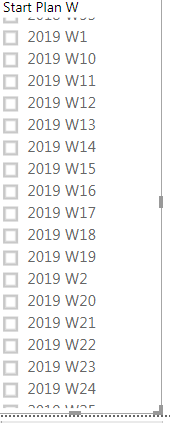
Currently, my order look so;
2018 W1
2018 W10
2018 W11
.
.
2018 W2
2018 W21
2018 W22
.
.
I want 2018 W1,2,3,4,5,6 . . . 2019 W1,2,3,4,5 . . .
any ideas how to do?
Solved! Go to Solution.
Hi @Anonymous
Please check the rank column.Make sure it is ranked by YearWeek column.Then use sort by column.
Rank = RANKX(Table3,Table3[YearWeek],,ASC,Dense)
Regards,
Cherie
Hi @Anonymous
You may sort the column with below steps. Attached the sample file for your reference.
let
Source = Table.FromRows(Json.Document(Binary.Decompress(Binary.FromText("Vc6xCcAwDAXRVYLrFLbiQG6SFML7rxFwIS6dD+vDy2zRx3O8o62z3t3x+wnH5ZiOW+GJFx7UPZJgCZZgCZZgCZYgCZIgCVuyPg==", BinaryEncoding.Base64), Compression.Deflate)), let _t = ((type text) meta [Serialized.Text = true]) in type table [Start = _t]),
#"Changed Type" = Table.TransformColumnTypes(Source,{{"Start", type text}}),
#"Inserted Text Range" = Table.AddColumn(#"Changed Type", "Text Range", each Text.Middle([Start], 0, 4), type text),
#"Inserted Text Range1" = Table.AddColumn(#"Inserted Text Range", "Text Range.1", each Text.Middle([Start], 6, 2), type text),
#"Changed Type1" = Table.TransformColumnTypes(#"Inserted Text Range1",{{"Text Range", type number}, {"Text Range.1", type number}}),
#"Sorted Rows" = Table.Sort(#"Changed Type1",{{"Text Range", Order.Ascending}, {"Text Range.1", Order.Ascending}}),
#"Added Index" = Table.AddIndexColumn(#"Sorted Rows", "Index", 1, 1)
in
#"Added Index"
Regards,
Cherie
thanks for your reply but what if i created 'Year Week' fomat in table like below?
Hi @Anonymous
You may create rank columns as below and then use 'Sort by column'.
YearWeek = YEAR(Table3[Date])*100+WEEKNUM(Table3[Date],2)
Rank = RANKX(Table3,Table3[YearWeek],,ASC)
Regards,
Cherie
I followed your advice.
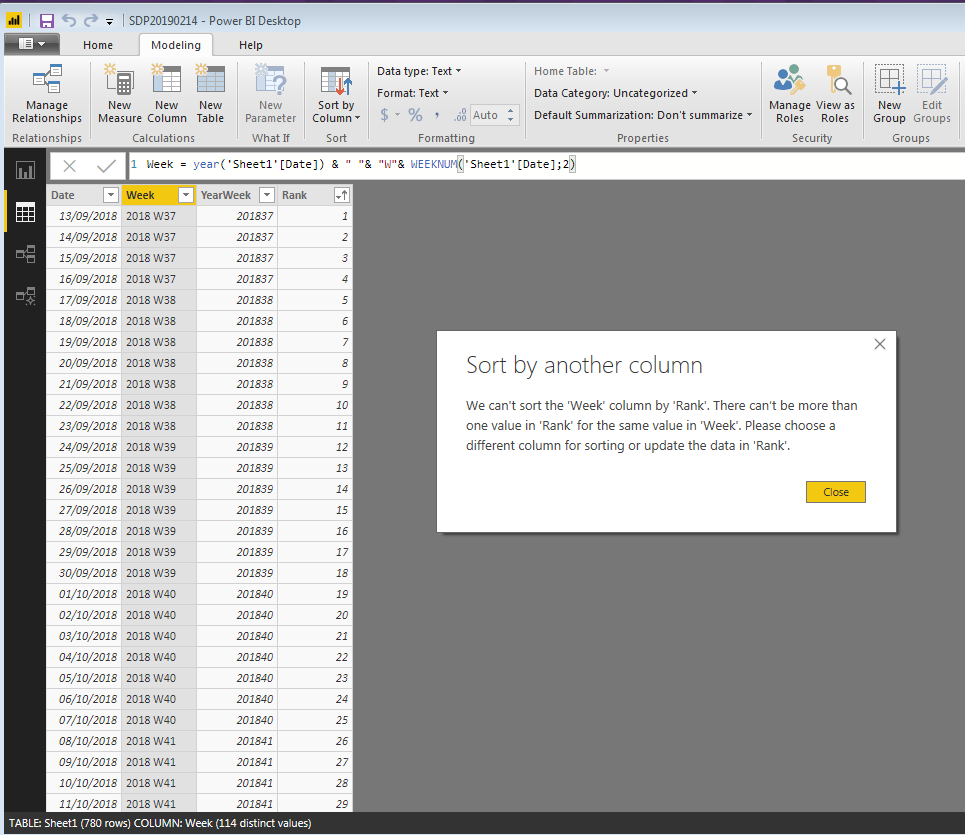
then i've got an error message saying like the pic below.
i am not sure what the problem is..!
Hi @Anonymous
Please check the rank column.Make sure it is ranked by YearWeek column.Then use sort by column.
Rank = RANKX(Table3,Table3[YearWeek],,ASC,Dense)
Regards,
Cherie
If you love stickers, then you will definitely want to check out our Community Sticker Challenge!
Check out the January 2026 Power BI update to learn about new features.
| User | Count |
|---|---|
| 64 | |
| 63 | |
| 49 | |
| 21 | |
| 18 |
| User | Count |
|---|---|
| 121 | |
| 118 | |
| 38 | |
| 36 | |
| 29 |