cancel
Showing results for 
Search instead for 
Did you mean: 

July 7 - July 17 | Round 2 of the Power BI Dataviz World Championships. Don't miss your chance! Learn more

Reply
PBIMike
Helper III
Helper III

Date Last Published

Hello,


I found some helpful guidance on these forums to be able to produce a "Date last refreshed" measure by using:

= Table.TransformColumnTypes(#"Renamed Columns",{{"DateTime", type datetime}})


What I'd like to be able to do is show my online users the date/time data was last published. Is it possible to either:

1) Have a specific measure that would update to show the date/time last published, or

2) Make it so that clicking 'Publish' would automatically refresh the data before uploading?


Many thanks,

Mike


1 ACCEPTED SOLUTION
Icey
Community Support
Community Support

Hi @PBIMike ,


Maybe you can try this:


1. Create a blank query in Power Query Editor like so:

let
    Source = DateTime.LocalNow(),
    #"Converted to Table" = #table(1, {{Source}}),
    #"Renamed Columns" = Table.RenameColumns(#"Converted to Table",{{"Column1", "LastPublishedDate"}})
in
    #"Renamed Columns"


2. Keep "Include in report refresh" unselected.

REFRESH.jpg


3. Create a Card visual to show "LastPublishedDate".

last.PNG


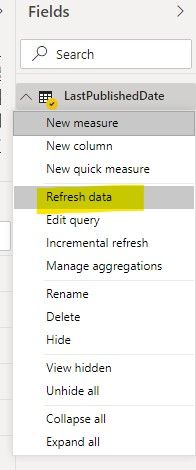
4. Before publishing the report, you need to refresh the data of the "LastPublishedDate" table, not refresh the report. 

refresh data.jpg


In this way, every time you refresh the report and dataset will not affect the last publishing time.


Best Regards,

Icey


If this post helps, then please consider Accept it as the solution to help the other members find it more quickly.

View solution in original post

2 REPLIES 2
Icey
Community Support
Community Support

Hi @PBIMike ,


Maybe you can try this:


1. Create a blank query in Power Query Editor like so:

let
    Source = DateTime.LocalNow(),
    #"Converted to Table" = #table(1, {{Source}}),
    #"Renamed Columns" = Table.RenameColumns(#"Converted to Table",{{"Column1", "LastPublishedDate"}})
in
    #"Renamed Columns"


2. Keep "Include in report refresh" unselected.

REFRESH.jpg


3. Create a Card visual to show "LastPublishedDate".

last.PNG


4. Before publishing the report, you need to refresh the data of the "LastPublishedDate" table, not refresh the report. 

refresh data.jpg


In this way, every time you refresh the report and dataset will not affect the last publishing time.


Best Regards,

Icey


If this post helps, then please consider Accept it as the solution to help the other members find it more quickly.

PBIMike
Helper III
Helper III

Of course there may just be a default setting in the browser version of Power BI that lets users see this as standard, that I just haven't found yet? 🙂

Helpful resources

Announcements
FabCon and SQLCon Barcelona 2026

FabCon & SQLCon – Barcelona 2026

Join us in Barcelona for FabCon and SQLCon, the Fabric, Power BI, SQL, and AI community event. Save €200 with code FABCMTY200.

60 days of Data Days Carousel

Data Days 2026

Join Fabric Data Days 2026: 60 days of free live/on-demand sessions, challenges, study groups, and certification opportunities.

Power BI DataViz World Championships carousel

Power BI DataViz World Championships - June 2026

A new Power BI DataViz World Championship is coming this June! Don't miss out on submitting your entry.