This time we’re going bigger than ever. Fabric, Power BI, SQL, AI and more. We're covering it all. You won't want to miss it.
Learn moreJoin the FabCon + SQLCon recap series. Up next: Power BI, Real-Time Intelligence, IQ and AI, and Data Factory take center stage. All sessions are available on-demand after the live show. Register now
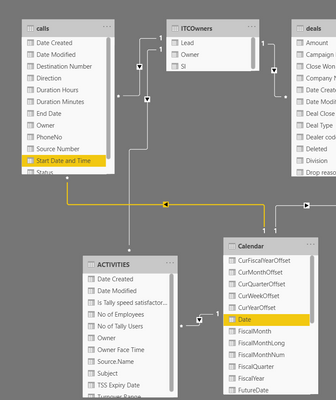
I have a calendar table linked to a Calls table, i am trying to get the day-wise calls, however it doesnt seem to work!
The Start Date and time field data type set to Date time
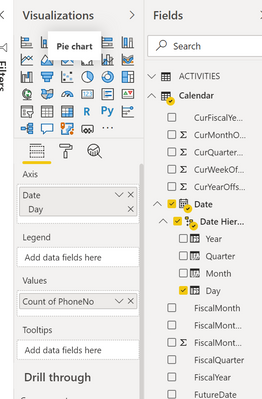
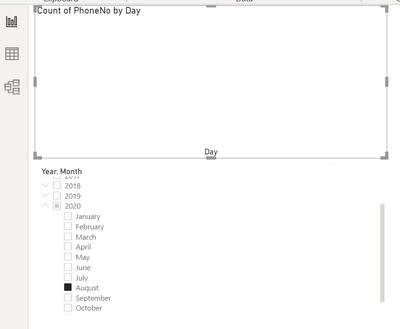
As you can see below the date hierarchy in calls table goes missing once i link the two tables, i am using the day field from the calendar table in axis and the count of phoneno field in Values field, why isnt it working?
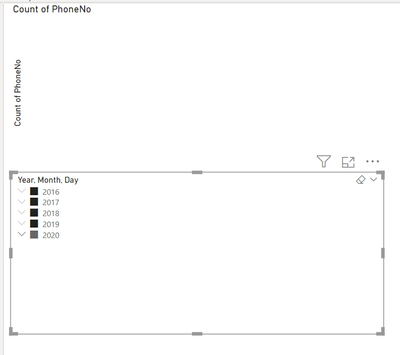
The slicer is referncing the fields from Calendar table
Please help, TIA
Solved! Go to Solution.
I would start by spliting your "Start Date And Time" into "Start Date" and "Start Time" columns. Otherwise you will have a Date data type looking at a datetime data type.
That would be my starting position
@praveenurs , These are the reasons Date Hierarchy can be missing
https://community.powerbi.com/t5/Desktop/Date-Hierarchy-Doesn-t-show/td-p/525460
https://community.powerbi.com/t5/Desktop/Date-hierarchy-not-available/td-p/438804
https://community.powerbi.com/t5/Desktop/Lost-Missing-Date-Hierarchy/td-p/421045
Check Settings
https://docs.microsoft.com/en-us/power-bi/transform-model/desktop-auto-date-time
You can create a new hierarchy
https://www.tutorialgateway.org/create-hierarchy-in-power-bi/
https://www.youtube.com/watch?v=x6vXVJZ_eTY
Checked the above, still not able to solve
Check the below, this means there's no match between the two however the calls dates are in fact between the calendar dates!
I would start by spliting your "Start Date And Time" into "Start Date" and "Start Time" columns. Otherwise you will have a Date data type looking at a datetime data type.
That would be my starting position
Check out the April 2026 Power BI update to learn about new features.
If you have recently started exploring Fabric, we'd love to hear how it's going. Your feedback can help with product improvements.
A new Power BI DataViz World Championship is coming this June! Don't miss out on submitting your entry.
| User | Count |
|---|---|
| 40 | |
| 39 | |
| 31 | |
| 22 | |
| 15 |
| User | Count |
|---|---|
| 76 | |
| 61 | |
| 34 | |
| 30 | |
| 25 |