Get certified for free when you join Fabric Data Days 2026 and dive into Fabric, Power BI, SQL, AI, and other essential data skills.
Join nowData Days is here! Join us now for 60+ days of learning, challenges, and connection. Learn more
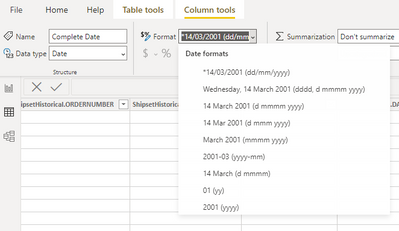
Hello, i already convert the date field into Date Type and format is on dd/mm/yy
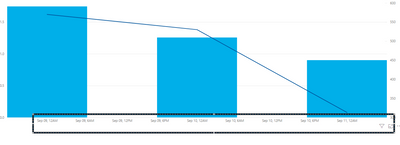
But when i insert them into chart, the label is still in different format. (see below)
Can somebody help?
Solved! Go to Solution.
Hi @Anonymous ,
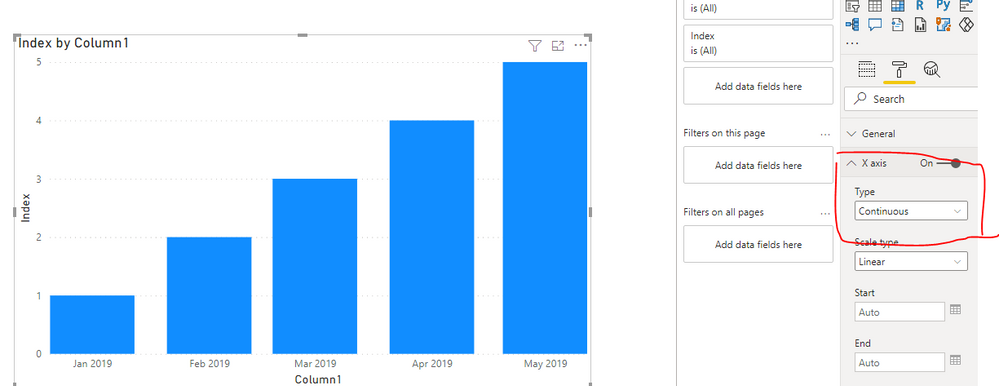
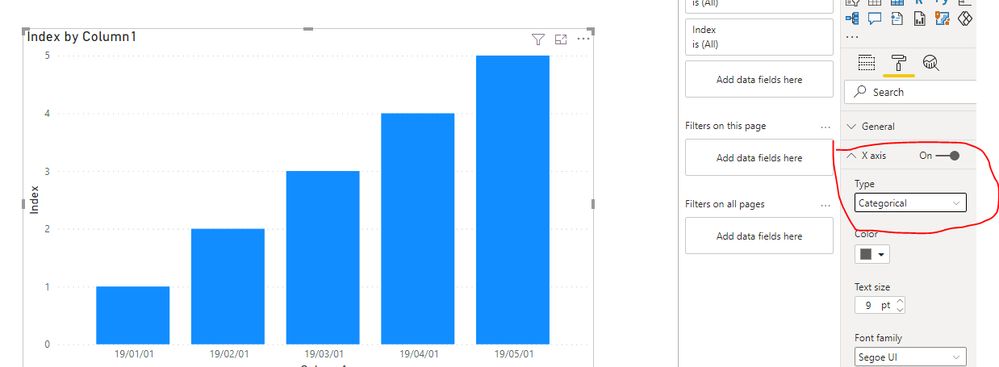
You can change the X axis type. when you create a stacked column chart in Power BI Desktop, you can change type of X-Axis to “Categorical” as long as you put numeric or Date/Time data type field to axis.
If this post helps, then please consider Accept it as the solution to help the other members find it more quickly.
Best Regards
Community Support Team _ Polly
Hi @Anonymous ,
You can change the X axis type. when you create a stacked column chart in Power BI Desktop, you can change type of X-Axis to “Categorical” as long as you put numeric or Date/Time data type field to axis.
If this post helps, then please consider Accept it as the solution to help the other members find it more quickly.
Best Regards
Community Support Team _ Polly
Don't miss out on Data Days, June 15 through August 7. Learn Fabric, Power BI, SQL, AI and more.
Check out the May 2026 Power BI update to learn about new features.
| User | Count |
|---|---|
| 23 | |
| 23 | |
| 21 | |
| 20 | |
| 15 |
| User | Count |
|---|---|
| 58 | |
| 55 | |
| 43 | |
| 30 | |
| 24 |