FabCon is coming to Atlanta
Join us at FabCon Atlanta from March 16 - 20, 2026, for the ultimate Fabric, Power BI, AI and SQL community-led event. Save $200 with code FABCOMM.
Register now!- Power BI forums
- Get Help with Power BI
- Desktop
- Service
- Report Server
- Power Query
- Mobile Apps
- Developer
- DAX Commands and Tips
- Custom Visuals Development Discussion
- Health and Life Sciences
- Power BI Spanish forums
- Translated Spanish Desktop
- Training and Consulting
- Instructor Led Training
- Dashboard in a Day for Women, by Women
- Galleries
- Data Stories Gallery
- Themes Gallery
- Contests Gallery
- QuickViz Gallery
- Quick Measures Gallery
- Visual Calculations Gallery
- Notebook Gallery
- Translytical Task Flow Gallery
- TMDL Gallery
- R Script Showcase
- Webinars and Video Gallery
- Ideas
- Custom Visuals Ideas (read-only)
- Issues
- Issues
- Events
- Upcoming Events
The Power BI Data Visualization World Championships is back! It's time to submit your entry. Live now!
- Power BI forums
- Forums
- Get Help with Power BI
- Desktop
- Re: Date Format option missing
- Subscribe to RSS Feed
- Mark Topic as New
- Mark Topic as Read
- Float this Topic for Current User
- Bookmark
- Subscribe
- Printer Friendly Page


- Mark as New
- Bookmark
- Subscribe
- Mute
- Subscribe to RSS Feed
- Permalink
- Report Inappropriate Content
Date Format option missing
Hi,
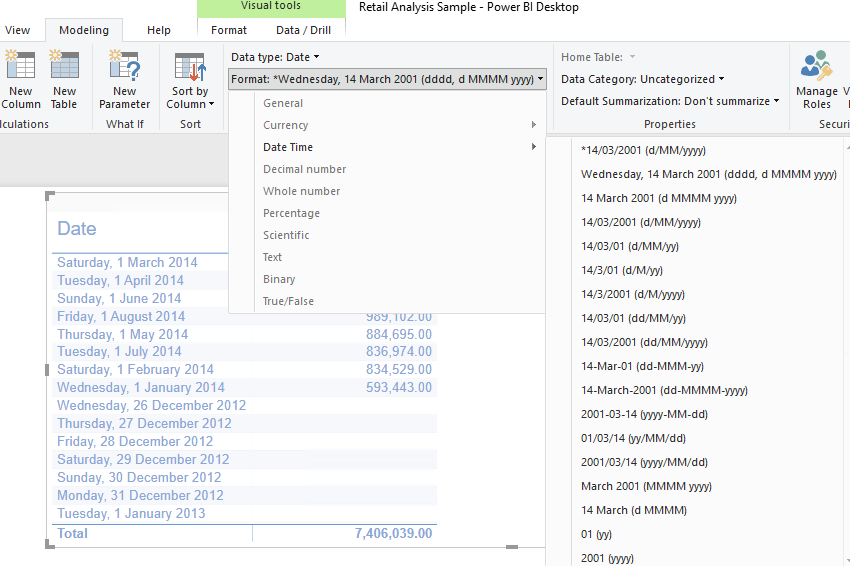
I used to be able to display the date format as dd/mm/yyyy or mmm dd, yyyy, when I selected Data Type: Date and the properties of different date displays will show. Now, under Data Type, I can select Date and Date/Time. Once selected, there is not option to change whether I will display the date as dd/mm/yyyy format or other formats.
Is there a problem in the version I used? Version: 2.65.5313.701 64-bit (December 2018)
Please help!
Thanks!
Solved! Go to Solution.

- Mark as New
- Bookmark
- Subscribe
- Mute
- Subscribe to RSS Feed
- Permalink
- Report Inappropriate Content
@cheryl-lee33,
What is you data source and do you get the issue in all Power BI reports? Could you please share PBIX file through Private Message so that I can check?
I am using the latest version of Power BI Desktop (2.65.5313.1381) and I can change date format without any issues.
Regards,
Lydia
- Mark as New
- Bookmark
- Subscribe
- Mute
- Subscribe to RSS Feed
- Permalink
- Report Inappropriate Content
- Mark as New
- Bookmark
- Subscribe
- Mute
- Subscribe to RSS Feed
- Permalink
- Report Inappropriate Content
Hi Lydia,
Thank you for your help.
I finally realised that I needed to select the data field, and then the Data type selection will be available within the Modeling menu.
I should have looked further before posting the question.
Thank you!
Cheryl
- Mark as New
- Bookmark
- Subscribe
- Mute
- Subscribe to RSS Feed
- Permalink
- Report Inappropriate Content
Btw, how do you change the status of this issue? Can't find it. Sorry!
- Mark as New
- Bookmark
- Subscribe
- Mute
- Subscribe to RSS Feed
- Permalink
- Report Inappropriate Content
Btw, how do you change the status of this issue? Can't find it. Sorry!
- Mark as New
- Bookmark
- Subscribe
- Mute
- Subscribe to RSS Feed
- Permalink
- Report Inappropriate Content
Hi Lydia,
Thank you for your help.
I finally realised that I needed to select the data field, and then the Data type selection will be available within the Modeling menu.
I should have looked further before posting the question.
Thank you!
Cheryl
- Mark as New
- Bookmark
- Subscribe
- Mute
- Subscribe to RSS Feed
- Permalink
- Report Inappropriate Content
- Mark as New
- Bookmark
- Subscribe
- Mute
- Subscribe to RSS Feed
- Permalink
- Report Inappropriate Content
@cheryl-lee33,
What is you data source and do you get the issue in all Power BI reports? Could you please share PBIX file through Private Message so that I can check?
I am using the latest version of Power BI Desktop (2.65.5313.1381) and I can change date format without any issues.
Regards,
Lydia
Helpful resources


| User | Count |
|---|---|
| 49 | |
| 37 | |
| 31 | |
| 22 | |
| 19 |


| User | Count |
|---|---|
| 134 | |
| 102 | |
| 59 | |
| 37 | |
| 36 |


