
Join us at FabCon Atlanta from March 16 - 20, 2026, for the ultimate Fabric, Power BI, AI and SQL community-led event. Save $200 with code FABCOMM.
Register now!The Power BI Data Visualization World Championships is back! Get ahead of the game and start preparing now! Learn more
Hi Everyone
I am having a few issues with the date format changing on a slicer between Desktop and the Web service.
Currently, the desktop displays as dd/mm/yyyy and the web service displays as mm/dd/yyyy after publishing the file.
My Regional Settings are configured to 'English (Australia) and I have done the same for the Google Chrome browser settings, however, the date slicer is still formatted as mm/dd/yyyy on the Web service.
Has anyone else experienced this issue?
Hello Bhavankit, I have tried to change the browser settings as per your solution but didnt work. I have also tried to change the date format using locale , but that also didnt work. Is there solution?
Hello @Anonymous ,
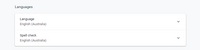
To resolve this issue, you will need to update your chrome setting as per below screenshot.
Also, restart the browser after applying such settings.
Thanks,
Bhavankit
Hi @Anonymous
Thanks for providing this information.
I have made these changes to my browser settings but I was hoping there was a way the report could default to dd/mm/yyyy irrespective of a users browser settings? We do have a large number of users and having them adjust their browser settings could take some time.
Hi @Anonymous ,
None as of now, this is the only solution we are able to find after putting lot of efforts on the same.
Thanks,
Bhavankit
Hi @Anonymous ,
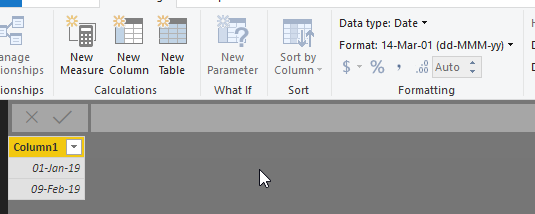
We can try to change the data format in Formatting.
Best Regards,
Teige
ff
The Power BI Data Visualization World Championships is back! Get ahead of the game and start preparing now!
Check out the November 2025 Power BI update to learn about new features.
| User | Count |
|---|---|
| 59 | |
| 43 | |
| 42 | |
| 23 | |
| 17 |
| User | Count |
|---|---|
| 190 | |
| 122 | |
| 96 | |
| 66 | |
| 47 |