cancel
Showing results for 
Search instead for 
Did you mean: 

Vote for your favorite vizzies from the Power BI Dataviz World Championship submissions. Vote now!

Reply
GK600
Helper II
Helper II

Date Format Error

Hi,


Hope someone can help me. I have looked through many forums but didn't come across this one.


My regional settings is English (United Kingdom) and Data load type detection is set to below.

 

GK600_0-1598912838042.png


My data source is excel file from an application which presents US date format like below.
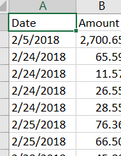
 

GK600_1-1598912928078.png


When I load the data, it appears as text format. 
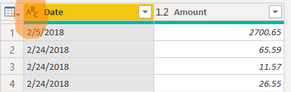
GK600_2-1598913072044.png


The date format ideally is the desired one (I want it to stay as US formatted only). So, I thought either of below may help but didn't  😞


1. Simply change the format to Date. When I do it, below error happens. Important thing to note here is that error only comes up for dates after 12th of the month.
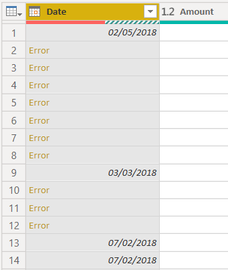
GK600_3-1598913283281.png


2. Or, I click the Date column > using locale > Date type as "Date" and Locale set to "English (US)". Strangely, it rather converts dates into United Kingdom format which is not what I want. See below.
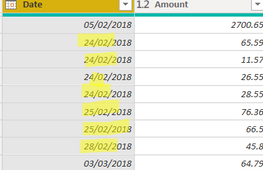
GK600_4-1598913473710.png


3. Changing my regional setting to English (United States) and then change the format of Date column to "Date". But it still appears in UK format (exactly as in 2nd attempt above).


I would appreciate if someone can look into it and help fixing this. I spent hours already. Any guidance will be appreciated. Thanks. 


Also, please find attached pbix and excel file in use for this.


https://1drv.ms/u/s!Aq2FeLHchvwogoFqQJywpf7U8Y8kKw?e=L8mfDt


regards,

Gaurav 

23 REPLIES 23

Thanks again @Greg_Deckler,


80% of the data is same format and lies in one of the folder so I think that helps. The columns may be slightly different in each file but I am OK with first file's column headings what it picks automatically (I know I can change that though). 


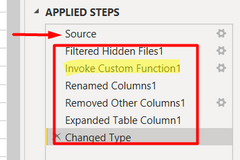
I was already using a Folder query. Looking at the automated steps applied by Power Query, I was not sure whether it expanded binaries column or other record/table colums. So, I manually expanded binaries column now and realised it takes same steps as earlier when expanded at source step below. Hope that makes sense and answer your question.


GK600_0-1599037951952.png


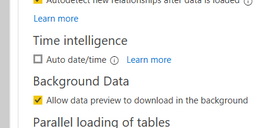
I wasnt sure but interstingly, Time intelligence was already switched off. See below.


GK600_1-1599038195531.png


Despite following this, the loading time had been somewhere upto 5-10 minutes. I am OK when I am closing and appying into Power BI desktop as thats one time but I got to simply look at all possible values in a column after a transformation step and it follows the same loading data process.


In other words, it goes through each file like below. Is there a way to know if folder query (binaries) helped reducing size? I am asking because the loading process goes through size of each file (so if a file is 40 mb in the folder, the below screenshot slowly moves up to 40mb and then move to next file.


GK600_2-1599038573556.png

Thanks very much again for your time to respond.


regards,

Gaurav


@GK600 - Yes, you should be getting good columnar compression if you are combining binaries into a single fact table.


Follow on LinkedIn
@ me in replies or I'll lose your thread!!!
Instead of a Kudo, please vote for this idea
Become an expert!: Enterprise DNA
External Tools: MSHGQM
YouTube Channel!: Microsoft Hates Greg
Latest book!:
DAX For Humans

DAX is easy, CALCULATE makes DAX hard...

Hi @GK600 ,


In Power BI you have set your Regional Settings to pick up the Windows setting Regional information by default.


Go to your windows machine Regional Settings and modify there US timezone:

Pragati11_2-1598965466723.png


Thanks,

Pragati

Best Regards,

Pragati Jain


MVP logo


LinkedIn | Twitter | Blog YouTube 

Did I answer your question? Mark my post as a solution! This will help others on the forum!

Appreciate your Kudos!!

Proud to be a Super User!!

Helpful resources

Announcements
Power BI DataViz World Championships

Power BI Dataviz World Championships

Vote for your favorite vizzies from the Power BI World Championship submissions!

Sticker Challenge 2026 Carousel

Join our Community Sticker Challenge 2026

If you love stickers, then you will definitely want to check out our Community Sticker Challenge!

January Power BI Update Carousel

Power BI Monthly Update - January 2026

Check out the January 2026 Power BI update to learn about new features.

FabCon Atlanta 2026 carousel

FabCon Atlanta 2026

Join us at FabCon Atlanta, March 16-20, for the ultimate Fabric, Power BI, AI and SQL community-led event. Save $200 with code FABCOMM.