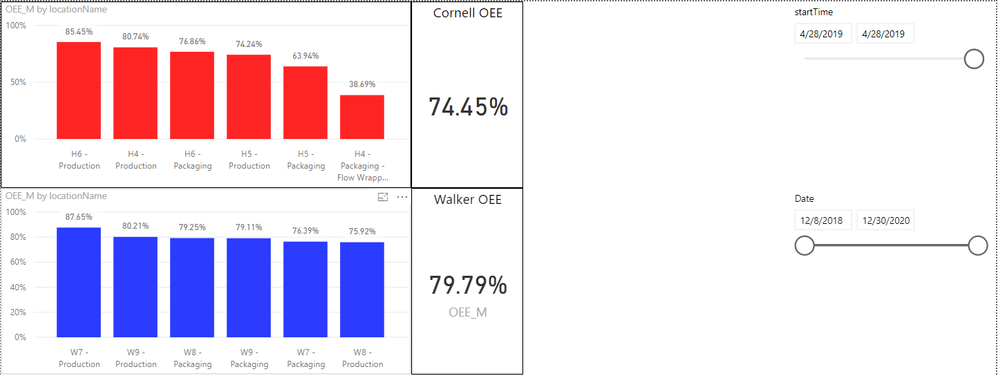
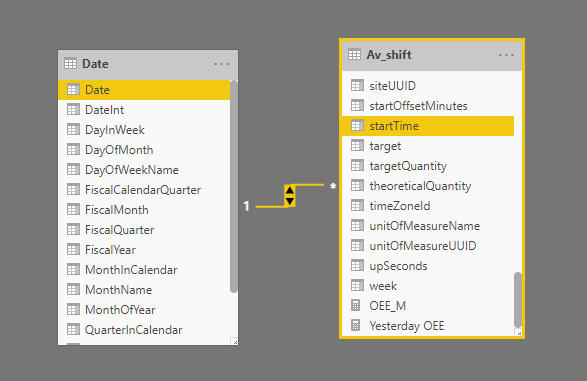
I have a few tables in Power BI that have date columns, I want to use 1 filter to control all of them in one report so I created a date table and created the relationships. However now when I filter by date using the new date table, the reports show up blank and I'm not sure why. I have done this a few times and never had an issue.
Anyone have any idea what the issue is here?
The first screen shot I'm using the date from the main table (Av_shift) to filter, which works fine. The second I'm trying to filter using the new date table, but the report just goes blank.
I also added some screen shots of the relationship and data showing that the data type is set to Date/Time.
Here is the Dax for the Date table:
let CreateDateTable = (StartDate as date, EndDate as date, FiscalYearStartDate as date, optional Culture as nullable text) as table =>
let
DayCount = Duration.Days(Duration.From(EndDate - StartDate)),
Source = List.Dates(StartDate,DayCount,#duration(1,0,0,0)),
TableFromList = Table.FromList(Source, Splitter.SplitByNothing()),
ChangedType = Table.TransformColumnTypes(TableFromList,{{"Column1", type date}}),
RenamedColumns = Table.RenameColumns(ChangedType,{{"Column1", "Date"}}),
InsertYear = Table.AddColumn(RenamedColumns, "Year", each Date.Year([Date])),
InsertQuarter = Table.AddColumn(InsertYear, "QuarterOfYear", each Date.QuarterOfYear([Date])),
InsertMonth = Table.AddColumn(InsertQuarter, "MonthOfYear", each Date.Month([Date])),
InsertDay = Table.AddColumn(InsertMonth, "DayOfMonth", each Date.Day([Date])),
InsertDayInt = Table.AddColumn(InsertDay, "DateInt", each [Year] * 10000 + [MonthOfYear] * 100 + [DayOfMonth]),
InsertMonthName = Table.AddColumn(InsertDayInt, "MonthName", each Date.ToText([Date], "MMMM", Culture), type text),
InsertCalendarMonth = Table.AddColumn(InsertMonthName, "MonthInCalendar", each (try(Text.Range([MonthName],0,3)) otherwise [MonthName]) & " " & Number.ToText([Year])),
InsertCalendarQtr = Table.AddColumn(InsertCalendarMonth, "QuarterInCalendar", each Number.ToText([Year]) & " " & "Q" & Number.ToText([QuarterOfYear])),
InsertDayWeek = Table.AddColumn(InsertCalendarQtr, "DayInWeek", each Date.DayOfWeek([Date])+1),
InsertDayName = Table.AddColumn(InsertDayWeek, "DayOfWeekName", each Date.ToText([Date], "dddd", Culture), type text),
InsertWeekEnding = Table.AddColumn(InsertDayName, "WeekEnding", each Date.EndOfWeek([Date]), type date),
InsertFiscalMonth = Table.AddColumn(InsertWeekEnding, "FiscalMonth",
each ( if Date.Month([Date]) >= Date.Month(FiscalYearStartDate) then Date.Month([Date]) - Date.Month(FiscalYearStartDate) + 1
else 12 - Date.Month(FiscalYearStartDate) + Date.Month([Date]) + 1 ), type number),
InsertFiscalQuarter = Table.AddColumn(InsertFiscalMonth, "FiscalQuarter", each Number.ToText([FiscalYear]) & " FQ" & Number.ToText([FiscalCalendarQuarter])),
InsertFiscalCalendarQuarter = Table.AddColumn(InsertFiscalQuarter, "FiscalCalendarQuarter",
each ( if Date.QuarterOfYear([Date]) >= Date.QuarterOfYear(FiscalYearStartDate) then Date.QuarterOfYear([Date]) - Date.QuarterOfYear(FiscalYearStartDate) + 1
else 4 - Date.QuarterOfYear(FiscalYearStartDate) + Date.QuarterOfYear([Date]) + 1)),
InsertFiscalYear = Table.AddColumn(InsertFiscalCalendarQuarter, "FiscalYear", each (if Date.Month([Date]) < Date.Month(FiscalYearStartDate) then Date.Year([Date]) else Date.Year([Date])+1), type number)
in
InsertFiscalYear,
#"Invoked FunctionCreateDateTable" = CreateDateTable(#date(2018, 12, 8), #date(2020, 12, 31), #date(2018, 1, 1), null)
in
#"Invoked FunctionCreateDateTable"