We've captured the moments from FabCon & SQLCon that everyone is talking about, and we are bringing them to the community, live and on-demand. Starts on April 14th. Register now
I'm trying to display the date in a visual as MM/YY (01/18, 02/18, etc.) instead of January 2018 or 1/01/18, but the option isn't there. Is is there a way to display just month and year without having to add a new date column to the query? I have multiple tables that need this type of date display and really don't want to take the time to add additional columns to all of them.
Any suggestions would be most welcome!
Solved! Go to Solution.
You just add the column to your Date table, then display that date. I use a MMM-YY style format (Jan-19, Feb-19) for example all of the time, but I only create the column once.
DAX is for Analysis. Power Query is for Data Modeling
Proud to be a Super User!
MCSA: BI ReportingHi @Anonymous ,
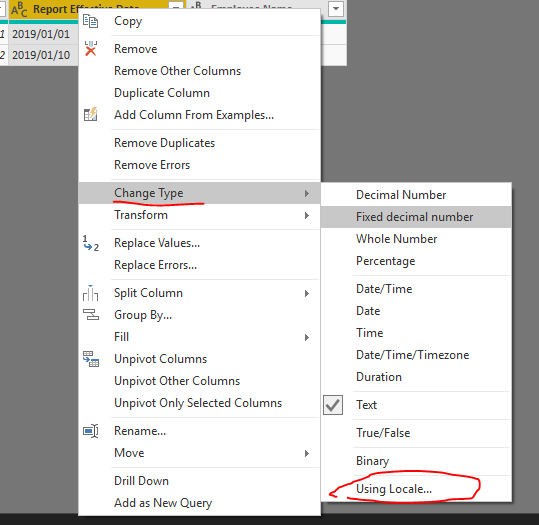
Please change the date type in power query by this way.
If you change the date to text, it will break date tables and date intelligence. You need to add a new column to the existing date table and leave the Date field as date format.
DAX is for Analysis. Power Query is for Data Modeling
Proud to be a Super User!
MCSA: BI ReportingYou just add the column to your Date table, then display that date. I use a MMM-YY style format (Jan-19, Feb-19) for example all of the time, but I only create the column once.
DAX is for Analysis. Power Query is for Data Modeling
Proud to be a Super User!
MCSA: BI ReportingIf you have recently started exploring Fabric, we'd love to hear how it's going. Your feedback can help with product improvements.
A new Power BI DataViz World Championship is coming this June! Don't miss out on submitting your entry.
Share feedback directly with Fabric product managers, participate in targeted research studies and influence the Fabric roadmap.
| User | Count |
|---|---|
| 54 | |
| 39 | |
| 32 | |
| 17 | |
| 15 |
| User | Count |
|---|---|
| 64 | |
| 63 | |
| 37 | |
| 36 | |
| 22 |