cancel
Showing results for 
Search instead for 
Did you mean: 

The Power BI Data Visualization World Championships is back! Get ahead of the game and start preparing now! Learn more

Reply
ian_coetzer
Frequent Visitor

Date Dimension - Not able to access Year, Month, Date Hierarchy?

Hi

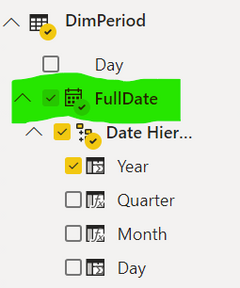
I created one PowerBI model with date dimensions which I am able to view in the Fields like this:

ian_coetzer_0-1613675087847.png


But then in another report model, I cannot view those fields and it is also a Date dimension?

(This is my question - why - even if the FullDate field is set as a Date, is there no calendar next to the field and no Year, Month, Day hierarchy?


ian_coetzer_1-1613675203975.png


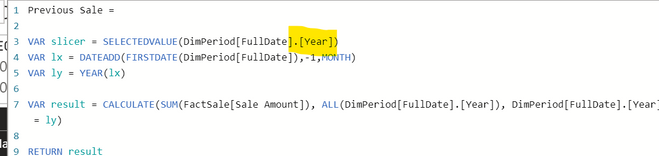
I am trying to implement a calculated DAX expression that works fine in the first data model:


ian_coetzer_2-1613675278785.png


2 REPLIES 2
v-alq-msft
Community Support
Community Support

Hi, @ian_coetzer 


The table is marked as a date table by specificing the 'FullDate' column as the date column. 
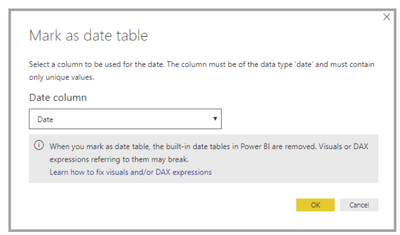
c1.png

It's important to note that when you specify your own date table, Power BI Desktop does not auto-create the hierarchies that it would otherwise build into your model on your behalf. If you later deselect your date table (and no longer have a manually set date table), Power BI Desktop recreates the automatically created built-in date tables for you, for the date columns in the table.


Also important to note is that when you mark a table as a date table, the built-in (automatically created) date table that Power BI Desktop created is removed, and any visuals or DAX expressions you previously created based on those built-in tables will no longer work properly.


I'd like to suggest you build a hierarchy manually. For further information, please refer to the following document.

Set and use date tables in Power BI Desktop 


Best Regards

Allan


If this post helps, then please consider Accept it as the solution to help the other members find it more quickly.

 

themistoklis
Community Champion
Community Champion

Hello @ian_coetzer ,


The date Hierarchy is automatically created when the 'Auto Date/Time' option is selected under Time Intelligence section. Probably it was enabled in one of the reports and disabled in the other one


See image below:

auto.JPG

Helpful resources

Announcements
Power BI DataViz World Championships

Power BI Dataviz World Championships

The Power BI Data Visualization World Championships is back! Get ahead of the game and start preparing now!

November Power BI Update Carousel

Power BI Monthly Update - November 2025

Check out the November 2025 Power BI update to learn about new features.

FabCon Atlanta 2026 carousel

FabCon Atlanta 2026

Join us at FabCon Atlanta, March 16-20, for the ultimate Fabric, Power BI, AI and SQL community-led event. Save $200 with code FABCOMM.