
Get certified for free when you join Fabric Data Days 2026 and dive into Fabric, Power BI, SQL, AI, and other essential data skills.
Join nowTry your skills in the Power BI Dataviz World Championship! Round one ends June 26. Join now
Hi Friends,
I have a situation in my model where I have 2 date tables ( created date and closed date).
I have created a date table using dax but the issue is how to sync all 3 tables together?
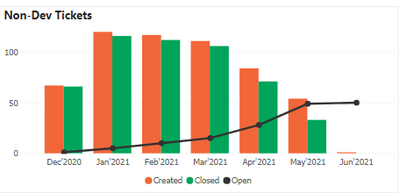
Currently i have a relationship of my dax date table with my created date in my model and the graph shows correct data for the created date whereas the data for closed date is not correct and when i make the relationship of my dax date table with the closed date the numbers for created date are wrong.
Any idea how to fix this? I want to show created and closed numbers together.
Please Note : I have two date tables in my model i.e Created and closed. I have created another date table using DAZ to setup the relationship.
https://www.dropbox.com/s/bzur2v335qpxsjr/Sample%20-%20Copy.pbix?dl=0
Above is the link for a sample pbix containing the data and the conditions. I want to show the non dev tickets together ( closed and opened)
Regards,
Himanshu
My initial suggestion would be to change the columns you are selecting to create the relationship from Month Year to Date- Created Date (DAX-Devops) and Closed Date - Date(Devops - M). If you want to avoid having a column for Created and a column for Closed, you'll have to create a measure that adds up the Closed tickets and the Created tickets, but this will generate ambiguity since a single ticket can be eventually closed so it does not make sense to add them up.
Don't miss out on Data Days, June 15 through August 7. Learn Fabric, Power BI, SQL, AI and more.
Check out the May 2026 Power BI update to learn about new features.
| User | Count |
|---|---|
| 24 | |
| 22 | |
| 20 | |
| 20 | |
| 13 |
| User | Count |
|---|---|
| 68 | |
| 55 | |
| 42 | |
| 39 | |
| 30 |