cancel
Showing results for 
Search instead for 
Did you mean: 

Learn from the best! Meet the four finalists headed to the FINALS of the Power BI Dataviz World Championships! Register now

Reply
cartman21
Helper I
Helper I

Date Add functionality with different dates

Hello,


I'm currently working on a project where i have 2 columns.


One column is the date a KPI is reported, titled Date and the other column is the number of months an option to purchase shares is valid from from the corresponding date, as laid out below:


    DATE                  Months


31/01/2017                 9

31/03/2017                 4

30/04/2017                 5


What I need to do is create a third column or measure which I can display, to be tilted "expiry date", which in example one would be 9 months after 31/01/2017, so 31/10/2017.


The problem I have is the DATEADD () Function allows me to to move each date in the DATE column by x number of months, but I need to be able to have different 'months' added to different dates as explained above.


Any help would be hugely appredicated!

6 REPLIES 6
sumit4732
Advocate II
Advocate II

Hi @cartman21,


You can use EOMONTH to ge the desired results 

As Column:

Column = EOMONTH(Table[Date],Table[Offset]-1)+DAY(Table[Date])

As Measure:

Measure= EOMONTH(MAX(Table[Date]),MAX(Table[Offset])-1)+DAY(MAX(Table[Date]))


Hope this helps.

-Sumit

cartman21
Helper I
Helper I

Any Ideas? Sorry, on a bit of a time crunch to figure this out!

Actually, no!


The Problem: the DAX-Function DATEADD expects that all the dates are available in the base columm. This will not be the case in most scenarios.


This means that you have to use the DATE function, and maybe you have to use nested IF statements to make sure you get what you want:

Assuming that your base date is 2017-01-31 and you want to add 1 Month the DAX could look like this

DATE(year("2017-01-31"), month("2017-01-31")+1, day("2017-01-31"))

The result will be "2017-03-03".


Due to the intricate working of DATEADD, you have to use DATE() that can become quite cumbersome considering Leapyears and stuff like that. Basically whenever day() results to 31, it can become an issue.


Did I answer your question? Mark my post as a solution, this will help others!

Proud to be a Super User!
I accept Kudos 😉
Hamburg, Germany
TomMartens
Super User
Super User

Hey,


there could be another issue using DATEADD(), this little sentence

... the dates in the current context.

from the official documentation is a hint, that the result one would expect, will not be returned, instead the cell will be blank.


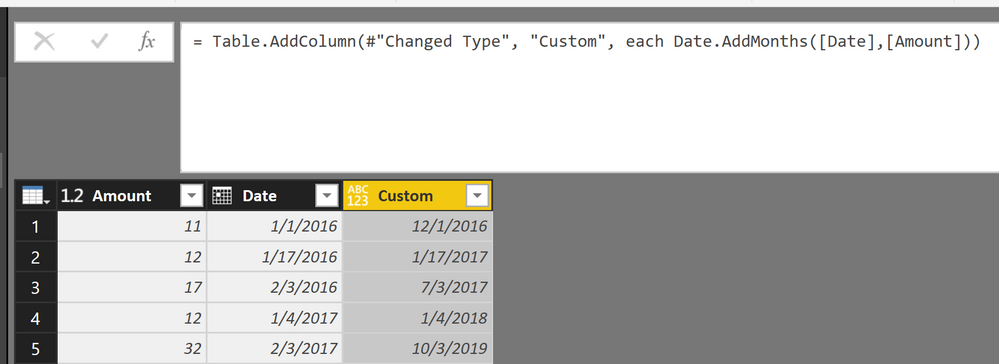
For this reason I recommend, to move one step down in your datapipeline and use M instead of DAX. The M function would be:

Date.AddMonths([Date],[Amount]))

Here is a little picture of the result

DATEADD vs Date.AddMonths.png


Hope this helps 


Did I answer your question? Mark my post as a solution, this will help others!

Proud to be a Super User!
I accept Kudos 😉
Hamburg, Germany

The problem I have is that the both the date column and the months to add are 'calculated columns. In M which you mention, it only recognizes originally provided columns in the database, and can't use calcuated columns for inputs it sems. Would you know what to do here? Any help would be greatly appreciated.

The problem I have is that the both the date column and the months to add are 'calculated columns.


In M which you mention, it only recognizes originally provided columns in the database, and can't use calcuated columns for inputs it sems.

Helpful resources

Announcements
Join our Fabric User Panel

Join our Fabric User Panel

Share feedback directly with Fabric product managers, participate in targeted research studies and influence the Fabric roadmap.

February Power BI Update Carousel

Power BI Monthly Update - February 2026

Check out the February 2026 Power BI update to learn about new features.

FabCon Atlanta 2026 carousel

FabCon Atlanta 2026

Join us at FabCon Atlanta, March 16-20, for the ultimate Fabric, Power BI, AI and SQL community-led event. Save $200 with code FABCOMM.