cancel
Showing results for 
Search instead for 
Did you mean: 

The Power BI Data Visualization World Championships is back! Get ahead of the game and start preparing now! Learn more

Reply
elJukes
Helper I
Helper I

Datatable Columns into Visualisation Rows

Hi


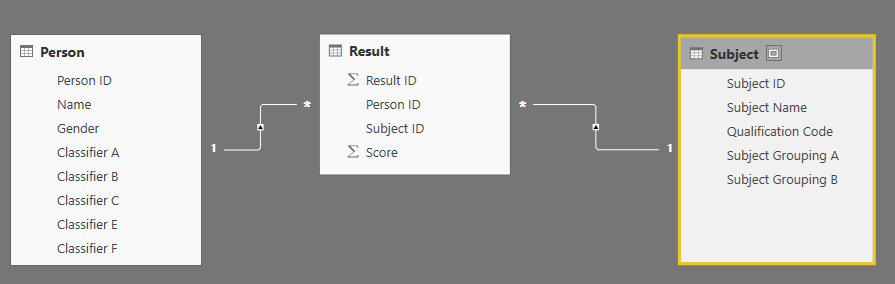
I have a simple data model setup for looking at student performance in various subjects:


DataModel.png


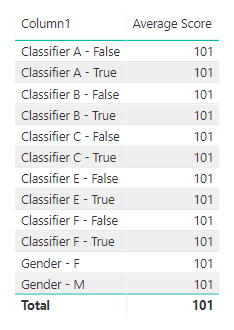
What I need to be able to do is, in a single visualisation, be able to produce something that looks like this:


OutputTable.png


But I'm not sure how. It's almost as if all of the columns in the Person table need to become rows so I can get them into a table or matrix visual looking like this and have measures work on them. I've tried doing some things with matrix visuals but I don't think I'm anywhere near advanced enough to achieve my goal.


Do I need to restructure my data or is it possible to get the desired output using DAX and/or formatting options in visuals?

Thanks in advance to anyone who can help,


Regards


Sam

1 ACCEPTED SOLUTION

Hi @v-lili6-msft


I had a go with unpivoting the data but I then had two tables representing my person information. After having a chat with someone last night I decided to create a classifier dimension and add classifier id to the fact table.


Thank you for your suggestion and for taking the time to look over the problem, I've been stuck with it for quite a while!

View solution in original post

2 REPLIES 2
v-lili6-msft
Community Support
Community Support

hi, @elJukes

You may try to Unpivot the columns in Edit Queries.

https://support.office.com/en-us/article/unpivot-columns-power-query-0f7bad4b-9ea1-49c1-9d95-f588221...

http://radacad.com/pivot-and-unpivot-with-power-bi

Click Home->Edit Queries into Power Query.


If not your case, please share your sample pbix file or some data sample and expected output. You can upload it to OneDrive and post the link here. Do mask sensitive data before uploading.


Best Regards,

Lin


Community Support Team _ Lin
If this post helps, then please consider Accept it as the solution to help the other members find it more quickly.

Hi @v-lili6-msft


I had a go with unpivoting the data but I then had two tables representing my person information. After having a chat with someone last night I decided to create a classifier dimension and add classifier id to the fact table.


Thank you for your suggestion and for taking the time to look over the problem, I've been stuck with it for quite a while!

Helpful resources

Announcements
November Power BI Update Carousel

Power BI Monthly Update - November 2025

Check out the November 2025 Power BI update to learn about new features.

Fabric Data Days Carousel

Fabric Data Days

Advance your Data & AI career with 50 days of live learning, contests, hands-on challenges, study groups & certifications and more!

FabCon Atlanta 2026 carousel

FabCon Atlanta 2026

Join us at FabCon Atlanta, March 16-20, for the ultimate Fabric, Power BI, AI and SQL community-led event. Save $200 with code FABCOMM.