Join us in Barcelona for FabCon and SQLCon, September 28 - October 1, 2026.
This is best Fabric, Power BI, SQL and AI community event. How do we know? The last event sold out! Save €200 with code FABCMTY200.
Register now- Power BI forums
- Get Help with Power BI
- Desktop
- Service
- Report Server
- Power Query
- Mobile Apps
- Developer
- DAX Commands and Tips
- Custom Visuals Development Discussion
- Health and Life Sciences
- Power BI Spanish forums
- Translated Spanish Desktop
- Training and Consulting
- Instructor Led Training
- Dashboard in a Day for Women, by Women
- Galleries
- Data Stories Gallery
- Themes Gallery
- Contests Gallery
- QuickViz Gallery
- Quick Measures Gallery
- Visual Calculations Gallery
- Fabric Apps Gallery
- Notebook Gallery
- Translytical Task Flow Gallery
- TMDL Gallery
- R Script Showcase
- Webinars and Video Gallery
- Ideas
- Custom Visuals Ideas (read-only)
- Issues
- Issues
- Events
- Upcoming Events
July 28 - August 9 | Final Round of the Power BI Dataviz World Championships. This is your chance. Learn more
- Power BI forums
- Forums
- Get Help with Power BI
- Desktop
- Dataset SQL Question
- Subscribe to RSS Feed
- Mark Topic as New
- Mark Topic as Read
- Float this Topic for Current User
- Bookmark
- Subscribe
- Printer Friendly Page

- Mark as New
- Bookmark
- Subscribe
- Mute
- Subscribe to RSS Feed
- Permalink
- Report Inappropriate Content
Dataset SQL Question
In the very near future, I will be migrating away from flat-file supported dashboards, to connecting PowerBI to a data store in SQL. We expect this will eliminate much oif the manual file movement and other people-drive processes.
My concern is that when we expand the dataset, and add columns and such over time, that PowerBI will hiccup. Since becoming a PowerBI user, I have seem many instances where PowerBI chokes upon refresh because it recognized the change in the "source file" - or does not automatically account for new columns.
What do I need to consider about dataset expansion, when the data live in SQL and no longer in a flat file.
Appreciate the help, and thanks.
Solved! Go to Solution.
- Mark as New
- Bookmark
- Subscribe
- Mute
- Subscribe to RSS Feed
- Permalink
- Report Inappropriate Content
@Anonymous,
When you connect to SQL Server database in Power BI Desktop, any time you make schema changes(for example, add new columns), you can click “Refresh” button in Power BI Desktop to bring the changes.
And after you publish PBIX file to Power BI Service, you can set schedule refresh for your dataset, this way, when data are changed in SQL Server database, the dataset will be updated automatically based on the schedule. However, please note that refresh in Power BI Service is purely data refresh, it will not load your schema changes. In other words, after you publish PBIX file to Power BI Service, if you make schema changes(for example, add new columns) in the SQL database, you will need to firstly refresh the dataset in Power BI Desktop, then re-publish the PBIX file to Service.
Regards,
Lydia
- Mark as New
- Bookmark
- Subscribe
- Mute
- Subscribe to RSS Feed
- Permalink
- Report Inappropriate Content
SQL wont have that issue. Column names are the important factor there.
- Mark as New
- Bookmark
- Subscribe
- Mute
- Subscribe to RSS Feed
- Permalink
- Report Inappropriate Content
@Anonymous,
When you connect to SQL Server database in Power BI Desktop, any time you make schema changes(for example, add new columns), you can click “Refresh” button in Power BI Desktop to bring the changes.
And after you publish PBIX file to Power BI Service, you can set schedule refresh for your dataset, this way, when data are changed in SQL Server database, the dataset will be updated automatically based on the schedule. However, please note that refresh in Power BI Service is purely data refresh, it will not load your schema changes. In other words, after you publish PBIX file to Power BI Service, if you make schema changes(for example, add new columns) in the SQL database, you will need to firstly refresh the dataset in Power BI Desktop, then re-publish the PBIX file to Service.
Regards,
Lydia
- Mark as New
- Bookmark
- Subscribe
- Mute
- Subscribe to RSS Feed
- Permalink
- Report Inappropriate Content
@Anonymous
Thanks for your feedback.
To draw a contrast however, when using an Excel or .csv hitting "Refresh" in desktop does not allow the new data to be recognized. A user has to account for the additional columns in "Query".
Is the distinction solely based on the source type, and could it really be as simple as your feedback explains when using SQL?
Thanks.
- Mark as New
- Bookmark
- Subscribe
- Mute
- Subscribe to RSS Feed
- Permalink
- Report Inappropriate Content
@Anonymous,
I am not able to reproduce your issue. After I add rows or new columns in Excel file/csv, newly added rows/columns are updated in Power BI Desktop after I click “Refresh” button. Could you please describe more details that how you operate in Power BI? And what error message do you get?
In addition, the process that I describe in my first reply also applies to the Excel/CSV data source.
Regards,
Lydia
- Mark as New
- Bookmark
- Subscribe
- Mute
- Subscribe to RSS Feed
- Permalink
- Report Inappropriate Content
@Anonymous
This will largely depend on how you structure your data and what you are relying upon. There are a number of methods of bringing data in from sources, including excel, that help handle your data in a flexible manner. It might be best to illustrate to us the exact issue you are having and we might be able to provide advice on how to resolve it.
- Mark as New
- Bookmark
- Subscribe
- Mute
- Subscribe to RSS Feed
- Permalink
- Report Inappropriate Content
Thanks all for being so engaged on this topic.
There have been instances that when using a .csv file and expanding the dataset over time, I needed to go to "Edit Queries", Source and Change the Column count from 25 to 26 so that PowerBI will recognize the new column(s). Columns=25
Simply "Refreshing" the data through Desktop does not allow the new column to be recognized.
I am asking if when I start using SQL will the expanded dataset (new columns) be automatically recognized?
Thanks.
- Mark as New
- Bookmark
- Subscribe
- Mute
- Subscribe to RSS Feed
- Permalink
- Report Inappropriate Content
@Anonymous,
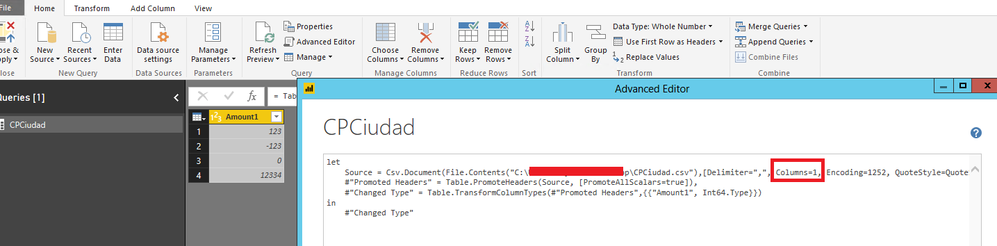
In addition to other's post, you can remove the Columns=25 part from your code in Advanced Editor, this way, Power BI can bring new columns after you click "Refresh" and you don't need to edit the columns count in the code.
Regards,
Lydia
- Mark as New
- Bookmark
- Subscribe
- Mute
- Subscribe to RSS Feed
- Permalink
- Report Inappropriate Content
Can you tell me more about this, and how to do it?
- Mark as New
- Bookmark
- Subscribe
- Mute
- Subscribe to RSS Feed
- Permalink
- Report Inappropriate Content
@Anonymous,
To aviod changing column counts after you import CSV file and add new column in the CSV file, you can remove the "Columns=number" part in Advanced Editor as shown in the following screenshot. This way, each time you add new columns in the CSV file, Power BI Desktop will bring you the new column after you click "Refresh" button. And you don't need to change its value from 25 to 26, then 27, 28 and so on.
Regards,
- Mark as New
- Bookmark
- Subscribe
- Mute
- Subscribe to RSS Feed
- Permalink
- Report Inappropriate Content
SQL wont have that issue. Column names are the important factor there.
Helpful resources

FabCon & SQLCon – Barcelona 2026
Join us in Barcelona for FabCon and SQLCon, the Fabric, Power BI, SQL, and AI community event. Save €200 with code FABCMTY200.

Fabric Community Sticker Challenge - Barcelona 2026
If you love stickers, then you will definitely want to check out our community sticker challenge, Barcelona edition!

Power BI Monthly Update - July 2026
Check out the July 2026 Power BI update to learn about new features.

Power BI DataViz World Championships - June 2026
A new Power BI DataViz World Championship is coming this June! Don't miss out on submitting your entry.

| User | Count |
|---|---|
| 25 | |
| 23 | |
| 19 | |
| 17 | |
| 14 |


| User | Count |
|---|---|
| 25 | |
| 23 | |
| 20 | |
| 20 | |
| 19 |


