Share feedback directly with Fabric product managers, participate in targeted research studies and influence the Fabric roadmap.
Sign up nowGet Fabric certified for FREE! Don't miss your chance! Learn more
Hello,
Can we have databar on Grandtotal of the matrix visual ?
As I know, we can in value, through conditional formating, but what I need is only in Grand total only (the last column)
Thanks,
Solved! Go to Solution.
hi, @admin_xlsior
Yes, you could get it as this way:
For example:
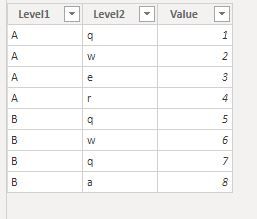
This is a simple sample data
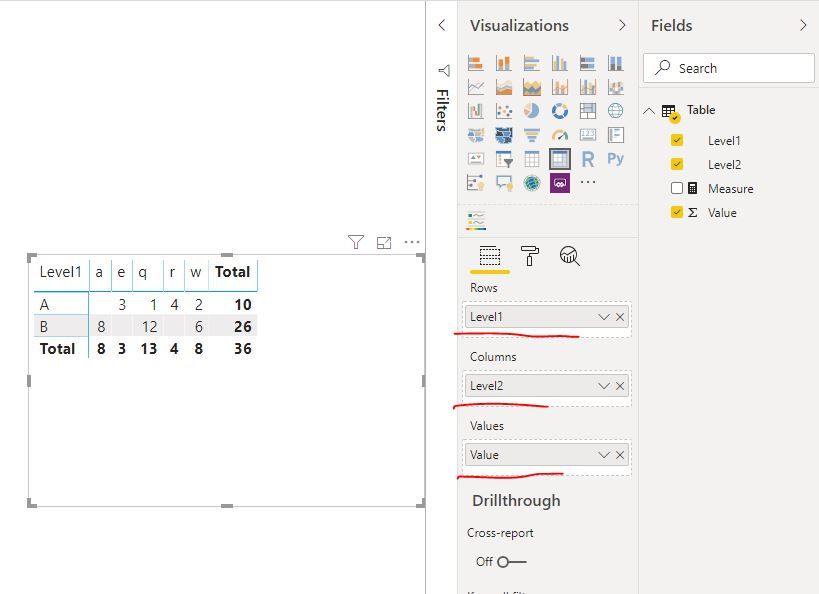
and this is matrix visual
Now create a measure by this logic
Measure = IF(ISFILTERED('Table'[Level2]),BLANK(),SUM('Table'[Value]))
Result:
and here is sample pbix file, please try it.
Regards,
Lin
hi, @admin_xlsior
Yes, you could get it as this way:
For example:
This is a simple sample data
and this is matrix visual
Now create a measure by this logic
Measure = IF(ISFILTERED('Table'[Level2]),BLANK(),SUM('Table'[Value]))
Result:
and here is sample pbix file, please try it.
Regards,
Lin
Share feedback directly with Fabric product managers, participate in targeted research studies and influence the Fabric roadmap.
| User | Count |
|---|---|
| 63 | |
| 62 | |
| 42 | |
| 19 | |
| 16 |
| User | Count |
|---|---|
| 118 | |
| 106 | |
| 38 | |
| 28 | |
| 27 |