Join us at FabCon Atlanta from March 16 - 20, 2026, for the ultimate Fabric, Power BI, AI and SQL community-led event. Save $200 with code FABCOMM.
Register now!The Power BI Data Visualization World Championships is back! Get ahead of the game and start preparing now! Learn more
I need to obtain a key from the server by placing a POST with basic auth. It works fine in Postman, but in PB Desktop it gives me:
DataSource.Error: Web.Contents with the Content option is only supported when connecting anonymously.
Here is my code:
let
url = "https://localhost:446/api/identity",
Source = Json.Document(Web.Contents(url, [Headers=[#"Content-Type"="application/x-www-form-urlencoded"],
Content = Text.ToBinary("{}")
]))
in
#"Source"
Is there a workaround or something?
Thanks
Solved! Go to Solution.
Hi @Markzolotoy
When you make POST requests in Power Query you must use Anonymous authentication when asked
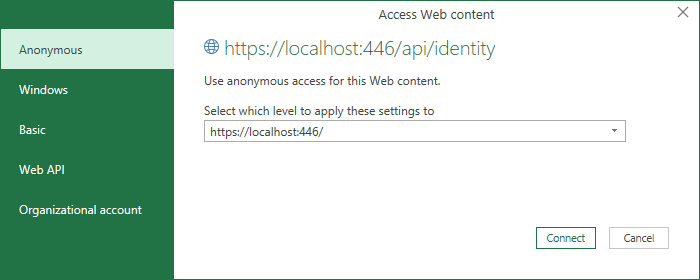
then in the actual query you supply the username and password and the authentication is performed via the Headers of the POST request
let
url = "https://localhost:446/api/identity",
ClientID = "xxxxxxxx", // Username
Secret = "xxxxxxxx", //Password
EncodedCredentials = "Basic " & Binary.ToText(Text.ToBinary(ClientID & ":" & Secret), BinaryEncoding.Base64),
Source = Json.Document(Web.Contents(url,
[
Headers = [#"Content-Type"="application/x-www-form-urlencoded",#"Authorization"=EncodedCredentials],
Content=Text.ToBinary("grant_type=client_credentials")
]
)
)
in
Source
You may need to edit the Data source settings for this connection on your PC, to change it to Anonymous
regards
Phil
Proud to be a Super User!
Hi @Markzolotoy
When you make POST requests in Power Query you must use Anonymous authentication when asked
then in the actual query you supply the username and password and the authentication is performed via the Headers of the POST request
let
url = "https://localhost:446/api/identity",
ClientID = "xxxxxxxx", // Username
Secret = "xxxxxxxx", //Password
EncodedCredentials = "Basic " & Binary.ToText(Text.ToBinary(ClientID & ":" & Secret), BinaryEncoding.Base64),
Source = Json.Document(Web.Contents(url,
[
Headers = [#"Content-Type"="application/x-www-form-urlencoded",#"Authorization"=EncodedCredentials],
Content=Text.ToBinary("grant_type=client_credentials")
]
)
)
in
Source
You may need to edit the Data source settings for this connection on your PC, to change it to Anonymous
regards
Phil
Proud to be a Super User!
The Power BI Data Visualization World Championships is back! Get ahead of the game and start preparing now!
| User | Count |
|---|---|
| 39 | |
| 37 | |
| 33 | |
| 32 | |
| 29 |
| User | Count |
|---|---|
| 133 | |
| 88 | |
| 85 | |
| 68 | |
| 64 |