cancel
Showing results for 
Search instead for 
Did you mean: 

Learn from the best! Meet the four finalists headed to the FINALS of the Power BI Dataviz World Championships! Register now

Reply
obesli
Frequent Visitor

DataSource.Error: SharePoint: Request failed

 Hi,


I created a report in PowerBI desktop, which connects to a SP2010 and retrieves data from sharepoint lists.

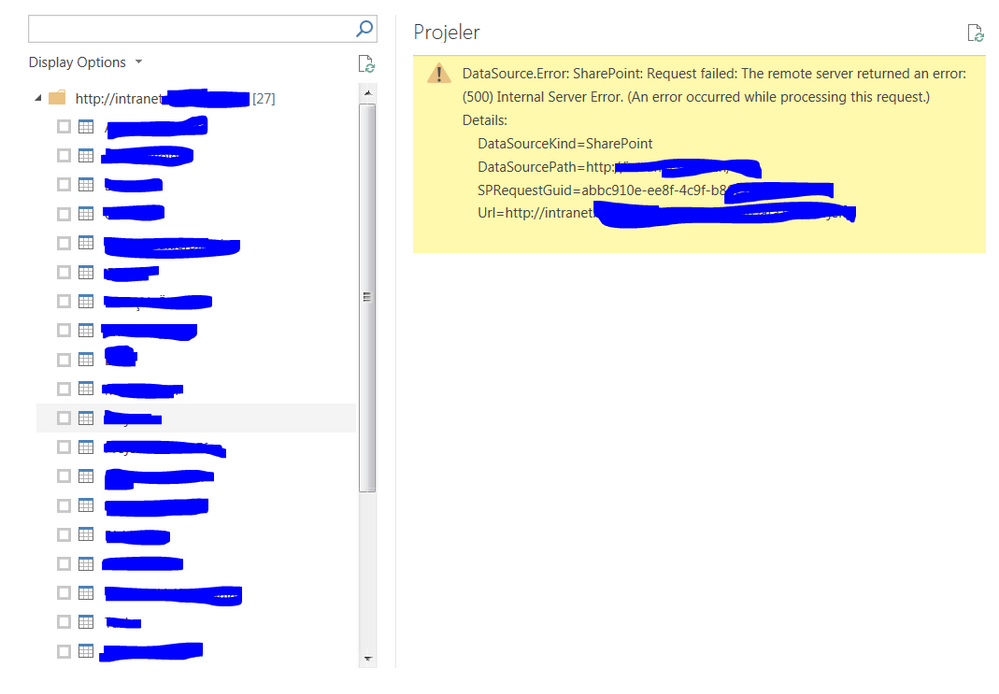
Everything works fine, but yewsterday when I want to refresh data in one list, I got following error. I use different lists in the same directory and I got this error only one list. I tried to create new connection in a blank PBIX and the same error appears again.


Here is the error:


Error.PNG

1 ACCEPTED SOLUTION
v-ljerr-msft
Microsoft Employee
Microsoft Employee

Hi @obesli,

I have just deleted the calculated column from my share point site library  then the problem solved.


Solution link

http://sharepoint.stackexchange.com/questions/65902/listdata-svc-gives-a-500-error-when-querying-som...


Were there any updates on that list recently? Could there be any calculated columns added on that list? Here is a similar thread, could you go to check if it helps in your scenario? Smiley Happy


Regards

View solution in original post

1 REPLY 1
v-ljerr-msft
Microsoft Employee
Microsoft Employee

Hi @obesli,

I have just deleted the calculated column from my share point site library  then the problem solved.


Solution link

http://sharepoint.stackexchange.com/questions/65902/listdata-svc-gives-a-500-error-when-querying-som...


Were there any updates on that list recently? Could there be any calculated columns added on that list? Here is a similar thread, could you go to check if it helps in your scenario? Smiley Happy


Regards

Helpful resources

Announcements
Power BI DataViz World Championships carousel

Power BI DataViz World Championships - June 2026

A new Power BI DataViz World Championship is coming this June! Don't miss out on submitting your entry.

Join our Fabric User Panel

Join our Fabric User Panel

Share feedback directly with Fabric product managers, participate in targeted research studies and influence the Fabric roadmap.

March Power BI Update Carousel

Power BI Community Update - March 2026

Check out the March 2026 Power BI update to learn about new features.